
Azure architecture defines how cloud services, identities, networks, data, and operations work together to meet business requirements. A useful design explains not just which resources exist, but how requests flow, who can change them, and what happens when something fails.
This guide develops a practical customer-portal architecture you can adapt, secure, deploy consistently, and maintain.
Start Azure Architecture With Business Requirements
Before selecting services, document the workload: the application and supporting components that deliver a business function.
For a regional distributor’s customer portal, establish:
- Expected users, peak transactions, and acceptable response times.
- Data sensitivity and geographic storage requirements.
- Availability targets and maintenance windows.
- Recovery time objective, or RTO: acceptable restoration time.
- Recovery point objective, or RPO: acceptable data loss measured in time.
- Monthly spending limits and operational ownership.
A portal that can tolerate several hours of recovery does not need the same regional redundancy as a critical payment platform.
Use the Azure Well-Architected Framework’s five concerns—reliability, security, cost optimization, operational excellence, and performance efficiency—to expose trade-offs. More redundancy improves resilience but adds expense and operational work.
Record major choices in short architecture decision records: the requirement, options, selected approach, and reason.
Pro Tip: I recommend agreeing on recovery targets before drawing the architecture. Otherwise, an affordable design can be rejected late because nobody defined acceptable downtime.
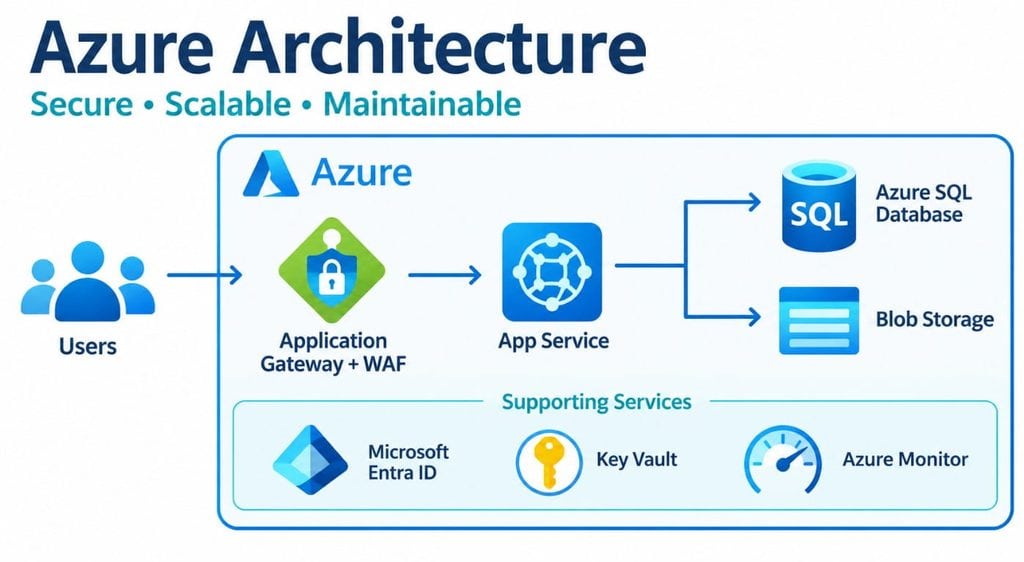
Build an Azure Architecture Around a Clear Request Flow
For the portal, use this logical flow:
Customer browser → Application Gateway with WAF → App Service → Azure SQL Database.
Supporting services include Blob Storage for documents, Key Vault for unavoidable secrets, and Azure Monitor for operational visibility.
| Component | Role | Decision rationale |
|---|---|---|
| Application Gateway | Regional HTTPS entry point | Centralizes routing and web application firewall inspection |
| Azure App Service | Hosts the web application and API | Avoids guest operating-system administration |
| Azure SQL Database | Stores transactional records | Provides managed relational database capabilities |
| Azure Blob Storage | Stores uploaded documents | Separates files from transactional tables |
| Azure Key Vault | Protects secrets and certificates | Centralizes access control and rotation |
A web application firewall, or WAF, examines HTTP requests for configured attack patterns. It supplements application security; it does not replace authorization or input validation.
This arrangement follows Microsoft’s baseline App Service pattern, including private back-end connectivity. It still requires configuration, load testing, and failure testing before production use.
Choose virtual machines when software requires operating-system control or unsupported dependencies. Choose Azure Functions for event-driven tasks, such as processing uploaded files. Neither justifies adding Kubernetes unless the workload and team actually require its orchestration capabilities.
Pro Tip: I recommend starting with managed services and documenting exceptions. Every self-managed server adds patching, hardening, backup, and support respo