
Azure Cosmos DB is rarely expensive by design; rather, it becomes expensive through misconfiguration. When you understand how Microsoft meters and charges for compute, storage, and networking, you can accurately forecast your cloud spend and eliminate runaway costs.
Azure Cosmos DB Pricing
Understanding the Core Currency: What Is a Request Unit (RU)?
To master Azure Cosmos DB pricing, you must first understand the fundamental unit of database throughput: the Request Unit (RU).
In traditional relational systems hosted on Azure Virtual Machines or AWS EC2, you provision fixed hardware metrics—vCPUs, RAM, and IOPS. Azure Cosmos DB abstracts this physical infrastructure into a deterministic performance currency measured as Request Units per second (RU/s).
A single Request Unit (1 RU) equals the compute, memory, and IOPS required to perform a single point read of a 1 KB JSON document using its unique item ID and partition key.
Key Factors That Inflate RU Consumption
- Document Payload Size: Writing a 10 KB item consumes significantly more RUs than writing a 1 KB item.
- Indexing Overhead: By default, Cosmos DB indexes every string, number, and nested object. While this provides rapid ad-hoc querying, it increases write operation costs.
- Consistency Level Selection: Relaxed consistency levels (Session, Eventual, Consistent Prefix) require standard RU costs. Selecting Strong or Bounded Staleness consistency requires reading across multiple replica copies, doubling read costs.
- Query Topology: Single-partition queries that leverage indexed properties execute efficiently at 2 to 5 RUs. Conversely, unbounded cross-partition queries scanning thousands of documents can quickly consume tens of thousands of RUs per request.
The Three Core Throughput Models Explained
Microsoft provides three distinct billing models for Azure Cosmos DB throughput. Choosing the wrong model for your traffic profile is the most common reason organizations overpay.
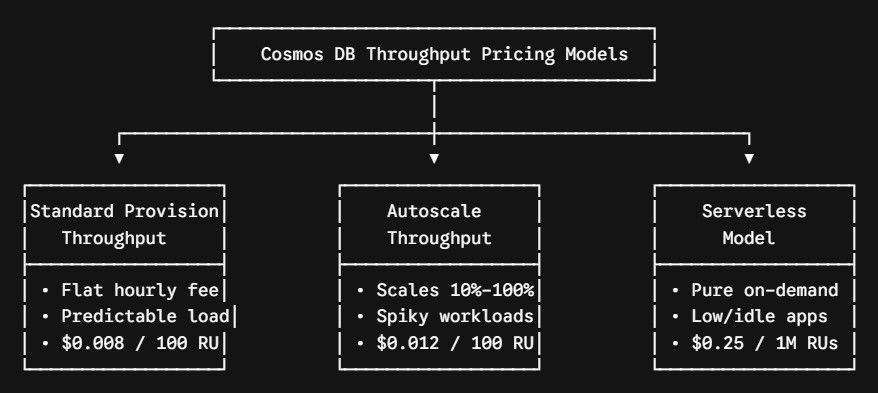
1. Standard (Manual) Provisioned Throughput
In this model, you explicitly allocate a fixed amount of throughput (e.g., 5,000 RU/s) to a container or database. You are billed a fixed rate of $0.008 per 100 RU/s per hour (in standard US regions), 24 hours a day, 7 days a week, regardless of whether your application consumes that capacity.
- Minimum Commitment: 400 RU/s per container or shared database (approximately $23.36/month for single-region deployment).
- Best Fit: Mission-critical enterprise applications with steady, highly predictable, 24/7 background traffic.
2. Autoscale Provisioned Throughput
Autoscale eliminates the administrative burden of manual capacity management by automatically scaling throughput dynamically between 10% and 100% of a defined maximum ceiling ($T_{max}$) based on incoming application demand.
- Pricing Formula: Autoscale is billed at $0.012 per 100 RU/s per hour—a 50% premium over standard manual provisioning. However, you only pay for the highest RU/s used in that specific hour, scaled down to 10% when idle.
- Scaling Mechanics: If you configure a $T_{max}$ of 10,000 RU/s, your system automatically adjusts between 1,000 RU/s and 10,000 RU/s. If your traffic drops to zero overnight, you are metered at only 1,000 RU/s ($0.12/hour) rather than paying for the full 10,000 RU/s ($1.20/hour).
- Best Fit: Workloads with unpredictable bursts, seasonal spikes, or high daytime activity paired with quiet overnight hours.
3. Serverless Mode
Serverless is a pure consumption-based model where you do not provision capacity in advance. You are billed strictly for the cumulative Request Units executed: $0.25 per 1,000,000 RUs consumed.
- Operational Bounds: Serverless containers operate in a single Azure region and scale up to 5,000 RU/s per partition, with storage capped at 1 TB per container.
- Best Fit: Development