
This guide breaks down the technical differences between Azure Cosmos DB and Azure SQL Database across architecture, scaling models, consistency guarantees, query capabilities, pricing structures, and real-world selection criteria.
Azure Cosmos DB vs Azure SQL Database
Architectural Foundations: Relational Power vs Distributed NoSQL
Understanding the core engine architecture explains why each database behaves the way it does under load.
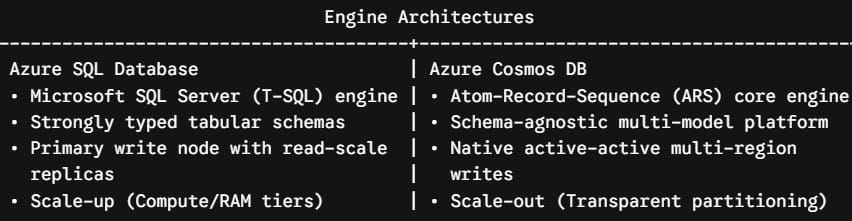
Azure SQL Database: The Relational Standard
Azure SQL Database is built upon the Microsoft SQL Server database engine. It is structured around the relational model, enforcing referential integrity through primary keys, foreign keys, constraints, and strict data typing.
- ACID Transactions: Provides native Atomicity, Consistency, Isolation, and Durability across complex multi-table operations.
- Storage Structure: Relies on pages, extents, clustered and non-clustered B-tree indexes, and optimized row/column storage.
- Deployment Options: Available as a single standalone database, an Elastic Pool (sharing pooled compute and memory across multiple tenant databases), or Hyperscale (decoupling compute and storage for multi-terabyte workloads).
Azure Cosmos DB: The Horizontally Partitioned Multi-Model Fabric
Azure Cosmos DB uses an Atom-Record-Sequence (ARS) core engine that treats data as an abstract type system rather than rigid tables or fixed document structures.
- Multi-Model APIs: Exposes its distributed core through multiple wire-protocol APIs, including the native API for NoSQL (JSON documents queried via SQL syntax), API for MongoDB, Apache Cassandra, Gremlin (Graph), and Azure Table.
- Automatic Indexing: Automatically indexes every property path in every JSON document without requiring upfront schema definitions.
- Turnkey Global Distribution: Designed from the ground up to replicate data across any number of Azure geographic regions with multi-region active writes and automated failover.
Feature Comparison Matrix
Here is an architectural breakdown of both platforms:
| Architectural Dimension | Azure SQL Database | Azure Cosmos DB |
| Primary Data Paradigm | Relational / Tabular (RDBMS) | NoSQL Document, Key-Value, Graph, Wide-Column |
| Schema Flexibility | Strict, predefined schema enforcement | Schema-agnostic / Dynamic JSON |
| Scaling Mechanism | Vertical scale-up (vCore/DTU) + Hyperscale read-replicas | Horizontal scale-out (Automatic physical partitioning) |
| Replication & Writes | Single primary write node (Active geo-replication for reads) | Active-Active Multi-Region Writes |
| Consistency Models | Full ACID (Read Committed, Snapshot, Serializable) | 5 Tunable Levels (Strong to Eventual) |
| Query Language | Transact-SQL (T-SQL) with complex multi-table JOINs | SQL dialect for NoSQL, MQL, CQL, Gremlin, OData |
| Performance SLA | High availability SLAs up to 99.995% | Single-digit ms read/write latency + 99.999% SLA |
| Throughput Unit | vCores, RAM, Storage IOPS, or DTUs | Request Units per second (RU/s) |
Data Modeling and Query Complexity
The way your engineering team structures and queries data determines your operational efficiency on either platform.
Relational Normalization vs Denormalization
Relational Approach (Azure SQL):
[Customers Table] <--(1:N)--> [Orders Table] <--(1:N)--> [OrderItems Table]
(Joined dynamically at query runtime via foreign keys)

Document Approach (Cosmos DB):
{
  "customerId": "cust_8472",
  "name": "David Miller",
  "orders": [
    { "orderId": "ord_101", "total": 240.50, "items": [...] }
  ]
}
(Denormalized hierarchical document retrieved in a single point read)
Querying in Azure SQL Database
Azure SQL supports full Transact-SQL (T-SQL) capabilities. If your business logic requires multi-table relational joins, recursive Common Table Expressions (CTEs), window functions, stored procedures, or triggers, Azure SQL handles these natively:
SQL
-- Azure SQL: Multi-Table Analytical Join
SELECT
    c.CustomerName,
    o.OrderID,
    SUM(oi.Quantity * oi.UnitPrice) AS TotalSpend
FROM Sales.Customers c
INNER JOIN Sales.Orders o ON c.CustomerID = o.CustomerID
INNER JOIN Sales.OrderItems oi ON o.OrderID = oi.OrderID
WHERE o.OrderDate >= '2026-01-01'
GROUP BY c.CustomerName, o.OrderID
ORDER BY TotalSpend DESC;
Querying in Azure Cosmos DB
Cosmos DB’s native NoSQL API allows you to query JSON documents using familiar SQL syntax. However, Cosmos DB is optimized for intra-document queries and lookups scoped to a single Partition Key:
SQL
-- Cosmos DB: Querying Embedded Arrays within a Document
SELECT
    c.customerName,
    c.orderId,
    item.productName,
    item.price
FROM c
JOIN item IN c.items
WHERE c.status = 'Shipped' AND c.region = 'US-East'- The Denormalization Rule: In Cosmos DB, cross-document relationships requiring relational joins across unrelated containers are an anti-pattern. Instead, data is denormalized and duplicated into embedded structures to allow fast, single-operation reads.
Scalability, Partitioning, and Multi-Region Topologies
How each database scales reveals the difference in their target workloads.
Scaling Azure SQL Database
Azure SQL scales vertically. To accommodate heavier traffic, you increase compute tiers (from 2 vCores up to 128 vCores) or add memory.
- Hyperscale Tier: For massive datasets, Azure SQL Hyperscale decouples compute from storage, supporting databases up to 100 TB with rapid snapshot backups and multiple read replicas.
- Replication Constraint: Azure SQL uses a single-master write model. While you can configure Active Geo-Replication with read-only replicas in secondary regions, all transactional write operations must route back to the primary instance region.
Scaling Azure Cosmos DB
Cosmos DB scales horizontally through automatic partitioning.
- Partition Keys: You define a partition key (e.g.,
tenantId,customerId,deviceId). Cosmos DB groups data into logical partitions (up to 20 GB each) and dynamically allocates physical server partitions as data grows. - Active-Active Multi-Region Writes: Cosmos DB allows applications to write to replicas across multiple geographic regions simultaneously. Built-in conflict resolution (such as Last-Write-Wins or custom merge routines) handles concurrent updates cleanly across global endpoints.
Consistency Guarantees and ACID Transactions
Transaction boundaries and consistency models differ significantly between these platforms.
Azure SQL: Full ACID Guarantee
Azure SQL guarantees full transaction isolation across multiple rows and tables. If an order placement requires updating an inventory record, charging a customer ledger, and creating an audit log entry within a single transaction, the database guarantees that all updates commit together or roll back entirely.
Cosmos DB: Tunable Consistency Spectrum
Cosmos DB provides five mathematically defined consistency levels:
- Strong: Linearizable reads across all regions. Provides strict consistency but increases latency for multi-region setups.
- Bounded Staleness: Reads may lag behind writes by a defined number of versions or a specific time window.
- Session (Default): Guarantees monotonic reads, monotonic writes, and read-your-own-writes for the specific client session.
- Consistent Prefix: Ensures updates are never seen out of order.
- Eventual: Convergent eventual consistency offering the lowest latency and highest throughput.
- Transaction Scope: Inside Cosmos DB, ACID multi-document transactions are supported, but they are scoped strictly to a single logical partition key and executed via JavaScript stored procedures or transactional batches.
Pricing Models and Capacity Planning
Budgeting for these two services requires fundamentally different approaches to capacity management.
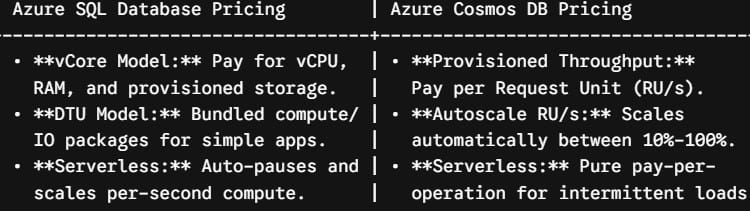
Azure SQL Pricing Dynamics
- Predictable Hourly Cost: In the vCore model, you pay for allocated compute cores and storage capacity. If your application runs continuous, steady-state queries, costs remain stable and predictable.
- Azure Hybrid Benefit: You can apply existing on-premises SQL Server core licenses with Software Assurance to reduce Azure SQL compute costs by up to 55%.
Cosmos DB Pricing Dynamics
- Request Units (RU/s): Throughput is measured in Request Units. Reading a 1 KB item using its ID and partition key costs 1 RU. Complex queries, large writes, and indexing increase the RU cost.
- Autoscale & Serverless: You can configure Autoscale (setting a maximum RU ceiling that scales dynamically) or Serverless (billing purely per consumed RU with no hourly baseline reservation).
- Cross-Region Multiplication: Provisioning 10,000 RU/s across five global regions provisions 10,000 RU/s in each region, multiplying baseline throughput costs accordingly.
Decision Framework: When to Choose Which Database
Choose Azure SQL Database If:
- Your domain model is highly relational: Your data naturally maps to normalized tables with foreign keys and parent-child hierarchies.
- You are migrating legacy enterprise applications: Your application relies on existing SQL Server schemas, views, stored procedures, or Object-Relational Mappers (like Entity Framework Core).
- Strict multi-table ACID transactions are mandatory: You are building financial bookkeeping, supply-chain inventory deductions, or core banking ledgers.
- You need advanced SQL reporting within the operational store: Your business users require complex aggregations and cross-table joins directly on transactional data.
Choose Azure Cosmos DB If:
- You need worldwide low latency and multi-region active writes: Your users are spread globally (e.g., across North America, Europe, and Asia) and need fast local read/write performance.
- Your data is semi-structured or schema-free: You manage dynamic JSON payloads, catalog variations, IoT telemetry streams, or user session state.
- Your workload demands massive horizontal write throughput: You need to ingest tens of thousands of write operations per second that scale beyond single-instance compute limits.
- You are building modern AI/RAG architectures: You want to store transactional data and high-dimensional vector embeddings in the same database without maintaining a separate vector search engine.
Technical Summary
Azure SQL Database and Azure Cosmos DB are complementary platforms designed for distinct engineering challenges.
For structured schemas, complex relational queries, and strict multi-table ACID transactions, Azure SQL Database remains the premier relational engine on Microsoft Azure. When your application demands flexible JSON schemas, massive horizontal scale, multi-region active writes, and single-digit millisecond latency SLAs, Azure Cosmos DB provides the distributed foundation required for modern cloud-native systems.
You may also like the following articles:

I am Rajkishore, and I am a Microsoft Certified IT Consultant. I have over 14 years of experience in Microsoft Azure and AWS, with good experience in Azure Functions, Storage, Virtual Machines, Logic Apps, PowerShell Commands, CLI Commands, Machine Learning, AI, Azure Cognitive Services, DevOps, etc. Not only that, I do have good real-time experience in designing and developing cloud-native data integrations on Azure or AWS, etc. I hope you will learn from these practical Azure tutorials. Read more.