
In this comprehensive tutorial, I will walk you through how the Azure Free Tier works under the hood, break down the eligible services and limits, compare it against competing cloud providers, and show you how to configure Azure so you never pay a single cent unless you choose to.
Azure Free Tier
The Three Pillars of the Azure Free Account
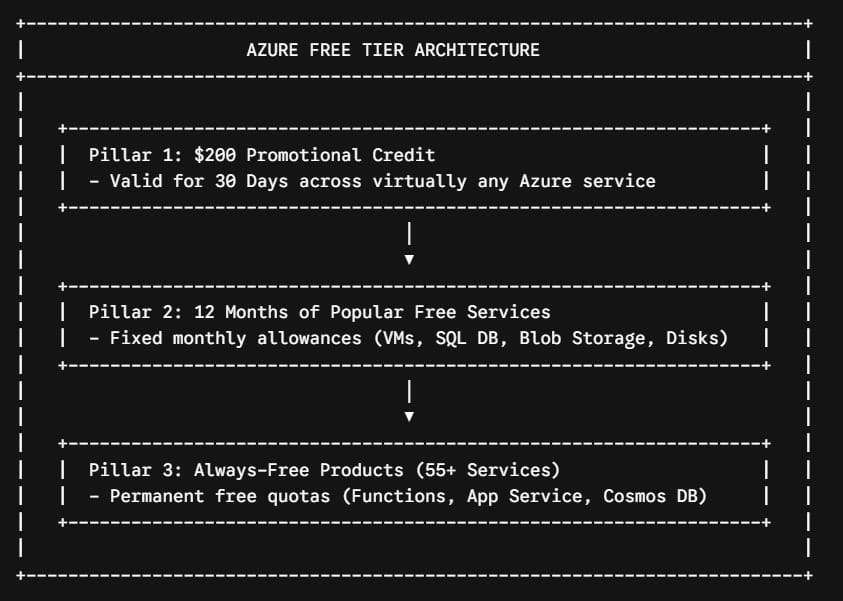
The Azure Free Account is not a single trial period; it is a structured, three-phase resource ecosystem designed to support evaluation, prototyping, and ongoing development.
When you understand how these three tiers interact, you can architect cloud environments that run continuously without incurring monthly subscription charges.
Pillar 1: The Initial Promotional Credit (First 30 Days)
When you register an Azure Free Account in the United States, Microsoft immediately deposits a $200 USD promotional credit into your subscription.
Check out How to Get Free Azure Credits
Key Rules Governing the $200 Credit:
- Lifespan: The credit must be used within 30 days of account creation. Any remaining balance after 30 days expires automatically.
- Scope of Coverage: The credit can be applied toward almost any service in the Azure catalog, including specialized Virtual Machine sizes (like GPU-enabled instances), Azure Kubernetes Service (AKS), AI Cognitive Services, and premium storage tiers.
- Third-Party Marketplace Exclusion: Promotional credits cannot be used to purchase third-party software, extensions, or software-as-a-service (SaaS) offerings listed on the Azure Marketplace.
Pillar 2: 12 Months of Popular Free Services
Beyond your 30-day promotional credit, your account includes 12 months of free access to specific core infrastructure and platform services. These allowances reset at the start of each billing cycle.
If your usage stays within these monthly allowances, you will not be billed:
| Azure Service | Monthly Free Allowance (12 Months) | Eligible SKU / Configuration Limit |
| Linux Virtual Machines | 750 Hours per month | B1s Burstable VM (1 vCPU, 1 GiB RAM) |
| Windows Virtual Machines | 750 Hours per month | B1s Burstable VM (1 vCPU, 1 GiB RAM) |
| Azure SQL Database | 250 Hours per month / 32 GB | S0 tier with 10 Database Transaction Units (DTUs) |
| Azure Blob Storage | 5 GB LRS (Locally Redundant Storage) | Hot/Cool tier (20,000 read / 10,000 write ops) |
| Managed Disks | 2 x 64 GB Storage | Standard SSD (E6) or Standard HDD (S6) |
| Azure Files | 5 GB Storage | LRS storage with up to 100,000 operations |
| Outbound Data Egress | 15 GB Data Transfer Out | Worldwide internet routing per month |
| Computer Vision (AI) | 5,000 Transactions | Free (F0) tier |
| Speech Translation | 5 Audio Hours | Standard tier allowance |
Architectural Note on 750 Hours: A standard calendar month has a maximum of 744 hours (31 days × 24 hours). A 750-hour monthly allowance means you can run one
B1sLinux VM and oneB1sWindows VM continuously 24/7 for an entire year without exceeding the limit.
Pillar 3: Always-Free Azure Services (55+ Products)
Even after your 30-day credit expires and your 12-month window closes, Microsoft provides access to over 55+ services that remain free indefinitely, provided your usage stays within defined quotas.
Detailed Breakdown of Top Always-Free Services:
- Azure App Service (F1 Tier): Host up to 10 web applications, REST APIs, or mobile backends using .NET, Node.js, Python, Java, or PHP on shared compute infrastructure with 1 GB of memory.
- Azure Functions: Serverless event processing providing 1,000,000 executions and 400,000 GB-seconds of resource consumption every month.
- Azure Co