
In this article, I will break down the core architectural, financial, security, and governance differences between Azure OpenAI Service and ChatGPT (including ChatGPT Plus, Team, and Enterprise). By the end, you will have a clear blueprint to choose the right AI foundation for your organization.
Azure OpenAI vs ChatGPT
Core Definitions: Understanding the Foundations
Before comparing specific capabilities, let’s establish clear definitions.
What is ChatGPT?
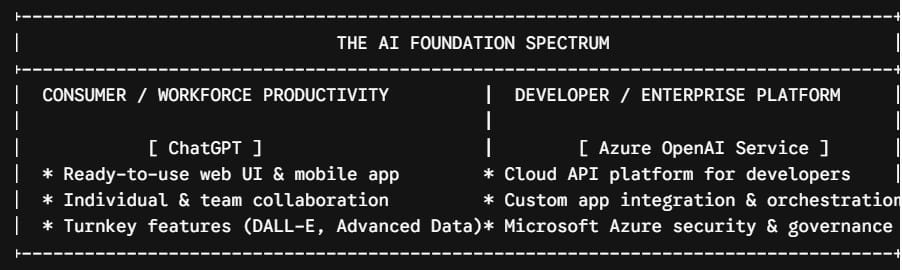
ChatGPT is a turnkey software-as-a-service (SaaS) application developed by OpenAI. It provides a conversational interface designed primarily for end-user interaction, document analysis, brainstorming, and ad-hoc task automation. It operates on OpenAI’s managed infrastructure and offers tiers ranging from free individual access to ChatGPT Enterprise.
What is Azure OpenAI Service?
Azure OpenAI Service is a platform-as-a-service (PaaS) offering resulting from the strategic partnership between Microsoft and OpenAI. It exposes OpenAI’s language models as cloud APIs within your organization’s Microsoft Azure ecosystem. Rather than a standalone chat portal for end-users, Azure OpenAI is designed for developers and engineers building enterprise applications, internal Copilots, and automated data pipelines.
Feature Comparison: Azure OpenAI vs. ChatGPT Enterprise
To simplify decision-making, the following matrix compares Azure OpenAI Service directly against ChatGPT Enterprise across key technical and operational dimensions:
| Dimension | Azure OpenAI Service | ChatGPT Enterprise |
| Primary Target Audience | Software Developers, Data Engineers, Solution Architects | Business Executives, Knowledge Workers, Teams |
| Primary Interface | REST APIs, SDKs (Python, .NET, JS), Azure Portal | Web UI, Desktop App, Mobile App |
| Hosting Infrastructure | Microsoft Azure Data Centers (US, EU, APAC) | OpenAI Managed Cloud Infrastructure |
| Data Privacy & Training | Data NEVER used to train foundation models | Data NEVER used to train enterprise models |
| Network Security | VNet integration, Private Endpoints, Managed Identity | SSO (SAML), Domain Verification, SCIM |
| SLA & Uptime Guarantee | Enterprise Financial SLA (up to 99.9%) | Service Availability Commitment |
| Billing Model | Pay-as-you-go per 1k tokens OR Provisioned Throughput (PTUs) | Per-user license subscription (Annual contracts) |
| Ecosystem Integration | Azure AI Search, Fabric, Power Platform, Microsoft 365 | Workspace admin controls, Custom GPT sharing |
Data Privacy, Compliance, and Enterprise Security
When evaluating AI services for enterprise deployments, data security is non-negotiable. Both Microsoft and OpenAI have structured robust enterprise privacy guarantees, but their underlying architectures handle data differently.
Azure OpenAI Data Boundaries
When you deploy a model in Azure OpenAI, your data remains fully contained within your organization’s Microsoft Azure tenant boundary:
- Zero Model Training: Your prompts, completions, embeddings, and training data are never used to train, retrain, or improve OpenAI or Microsoft foundation models.
- Network Isolation: Azure OpenAI supports Azure Private Endpoints and Virtual Networks (VNets). This means model traffic never travels over the public internet.
- Authentication: Access is governed via Microsoft Entra ID (formerly Azure Active Directory) with Role-Based Access Control (RBAC) and Managed Identities, eliminating hardcoded API keys.
- Compliance Certifications: Inherits Microsoft Azure’s extensive compliance portfolio, including HIPAA, SOC 1/2/3, ISO 27001, FedRAMP, and PCI-DSS.
ChatGPT Enterprise Data Boundaries
ChatGPT Enterprise provides specialized privacy controls designed for business usage:
- Zero Model Training: Prompts and conversation history within ChatGPT Enterprise workspace accounts are never used to train OpenAI models.
- Data Encryption: All conversations are encrypted at rest using AES-256 and in transit using TLS 1.2+.
- Administrative Oversight: IT administrators gain access to centralized admin consoles, Single Sign-On (SSO via SAML 2.0), domain verification, and system logging.
Architectural Comparison: Custom Applications vs. Out-of-the-Box Productivity
Understanding how your workforce or application will consume AI is the most critical factor in this evaluation.
Scenario A: Building Custom Intelligent Applications (Choose Azure OpenAI)
If your goal is to embed generative AI capabilities into existing enterprise software, Azure OpenAI is built specifically for this purpose.
Common architectural patterns for Azure OpenAI include:
- Retrieval-Augmented Generation (RAG): Grounding LLMs on internal company documentation using Azure AI Search vector databases.
- Automated Document Processing: Ingesting claims, invoices, or legal contracts via Azure Logic Apps and summarizing them through API calls.
- Multi-Agent Systems: Deploying autonomous AI agents orchestrated via Frameworks like AutoGen or Semantic Kernel running on Azure App Services.
Scenario B: Empowering Knowledge Worker Productivity (Choose ChatGPT)
If your goal is to give employee teams a conversational tool for day-to-day writing, data analysis, and brainstorming, ChatGPT Enterprise or Team provides an immediate, zero-code solution.
Key turnkey capabilities in ChatGPT include:
- Advanced Data Analysis: Uploading raw CSV or Excel spreadsheets to generate instant Python-based statistical summaries and visualizations.
- Custom GPTs: Creating no-code custom chatbots pre-loaded with team-specific guidelines and files.
- Multimodal Canvas: Interactively generating text, code, and images in a unified workspace without developer intervention.
Financial Models: Pay-as-You-Go vs. Seat-Based Licensing
The financial structures of these two platforms are completely different. Selecting the wrong model can lead to significant cost inefficiencies.
1. Azure OpenAI Pricing Structure
Azure OpenAI operates primarily on a consumption-based model measured in tokens (roughly 4 characters of text per token).
- Pay-As-You-Go: You pay strictly for the input and output tokens your applications consume.
- Best for: Applications with variable traffic, internal POCs, or low-to-medium volume production apps.
- Provisioned Throughput Units (PTUs): You reserve dedicated model processing capacity for a fixed hourly rate.
- Best for: High-throughput mission-critical applications requiring predictable latency and guaranteed API availability without rate-limiting risks.
2. ChatGPT Pricing Structure
ChatGPT uses a traditional per-user, seat-based subscription model.
- ChatGPT Plus: $20 / user / month (Individual subscription).
- ChatGPT Team: $25 – $30 / user / month (Minimum 2 users, billed annually or monthly).
- ChatGPT Enterprise: Custom pricing based on seat volume (Requires annual agreement, typically starting at 150+ seats).
Content Filtering and Responsible AI Governance
Both platforms incorporate safety guardrails to mitigate harmful content, jailbreak attempts, and toxic output, but Azure OpenAI gives administrators far greater control over those guardrails.
Azure AI Content Safety Filters
Azure OpenAI includes Azure AI Content Safety built directly into the API pipeline. Solution architects can customize content filtering severity across four distinct harm categories:
- Hate speech
- Sexual content
- Violence
- Self-harm
Furthermore, Azure OpenAI provides configurable thresholds for Jailbreak Detection (blocking prompt-injection attacks) and Protected Material Detection (flagging responses that match copyrighted source material). IT teams can adjust these thresholds from Strict to Off based on domain requirements.
ChatGPT Guardrails
ChatGPT utilizes standardized, system-level safety guardrails configured globally by OpenAI. While highly effective at preventing harmful outputs, these filters are fixed and cannot be fine-tuned or customized by workspace administrators.
Step-by-Step Tutorial: How to Evaluate and Choose
Follow this structured framework to determine which platform aligns with your enterprise goals.
Step 1: Define the Primary End-User
- Is the primary user an employee looking for a conversational chat assistant?
- Path: Proceed to Evaluate ChatGPT Enterprise / Team.
- Is the primary user an external customer or an internal software application?
- Path: Proceed to Evaluate Azure OpenAI Service.
Step 2: Assess Your Infrastructure & Security Requirements
Ask your Chief Information Security Officer (CISO) and Cloud Engineering leads:
- Does the application require private VNet deployment?
- Does the solution require integration with existing Azure Managed Identity or RBAC policies?
- Do you need to store logs in your own Azure Log Analytics workspace?
If you answered YES to any of these questions, Azure OpenAI is your recommended platform.
Step 3: Determine Development Capacity
- Zero Engineering Resources Available: Choose ChatGPT Enterprise. You can deploy it across your organization in days without writing code.
- Full Application Engineering Team Available: Choose Azure OpenAI Service. Your team can build customized workflows using frameworks like LangChain, LlamaIndex, or Microsoft Semantic Kernel.
Frequently Asked Questions (FAQ)
Are the AI models in Azure OpenAI identical to those in ChatGPT?
Yes. Azure OpenAI provides access to the exact same foundational model weights developed by OpenAI (including GPT-4o, GPT-4, and text-embedding models). However, model update timelines may vary slightly between the two platforms.
Can we deploy a custom web chat interface for employees using Azure OpenAI?
Yes. Microsoft provides open-source, pre-built web application templates (such as the popular Sample Chat App with Azure OpenAI) that allow engineering teams to deploy a secure, custom-branded ChatGPT-like portal using Azure OpenAI and Azure App Services.
If my company uses Microsoft 365, do we automatically get Azure OpenAI?
No. Microsoft 365 Copilot, Azure OpenAI Service, and ChatGPT are distinct offerings. Azure OpenAI requires an active Azure subscription and is billed separately based on token usage or provisioned capacity.
Can I migrate custom GPTs built in ChatGPT to Azure OpenAI?
Not directly with a single click. Custom GPT instructions and uploaded documents can be adapted into an Azure OpenAI architecture by building a RAG pattern using Azure AI Search and deploying system prompts via API calls.
Decision Summary Framework
To finalize your architecture strategy, use this summary blueprint:
- Select ChatGPT Enterprise when: You need a turnkey, zero-code workspace assistant to boost employee productivity, analyze files, and generate content across teams under flat-rate seat pricing.
- Select Azure OpenAI Service when: You are engineering custom enterprise software, integrating LLM capabilities into existing systems, enforcing strict private cloud networking controls, or handling high-volume programmatic API traffic.
You may also like the following articles:
- How to Create a Chatbot in Azure
- Azure Machine Learning vs Azure AI Foundry
- Azure OpenAI Tutorial for Beginners
- Azure AI Foundry vs Google Vertex AI

I am Rajkishore, and I am a Microsoft Certified IT Consultant. I have over 14 years of experience in Microsoft Azure and AWS, with good experience in Azure Functions, Storage, Virtual Machines, Logic Apps, PowerShell Commands, CLI Commands, Machine Learning, AI, Azure Cognitive Services, DevOps, etc. Not only that, I do have good real-time experience in designing and developing cloud-native data integrations on Azure or AWS, etc. I hope you will learn from these practical Azure tutorials. Read more.