
In this article, I will walk you through what the Azure Standard tier encompasses across core infrastructure pillars. We will evaluate how Standard compares to Basic and Premium tiers, examine technical feature matrices, and review design best practices to ensure your enterprise workloads remain performant and cost-efficient.
Azure Standard
What Is the Azure Standard Tier?
In the Microsoft Azure ecosystem, resource tiers define service capabilities, scale limits, redundancy options, and availability guarantees. Azure generally segments resources across three primary operational tiers:
- Basic Tier: Designed strictly for non-production environments, dev/test workloads, light proofs-of-concept (PoCs), and entry-level experiments. It typically offers limited throughput, lacks multi-zone availability, and carries minimal or no financial-backed SLAs.
- Standard Tier: The enterprise workhorse tier. It is designed for multi-user production applications, mission-critical databases, secure networking, and enterprise integration pipelines. Standard tier resources include high availability (HA) options, zone-redundant storage (ZRS), advanced telemetry, and enterprise SLAs (often 99.9% to 99.99%).
- Premium / Enterprise Tier: Engineered for ultra-low latency, extreme I/O throughput (such as high-transaction financial systems or large SAP HANA nodes), dedicated hardware isolation, and specialized compliance configurations.
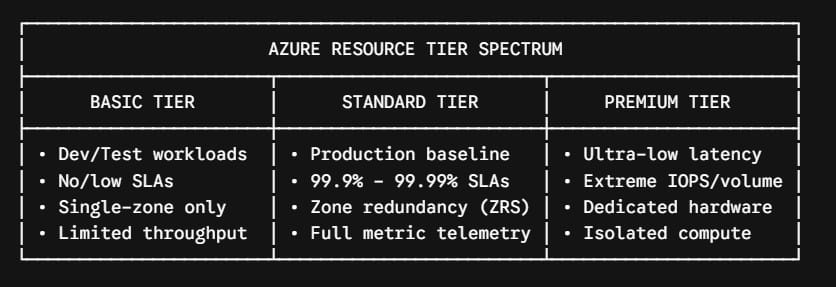
Azure Standard Across Core Cloud Pillars
Because the term “Standard” applies to distinct services across Azure, let us dissect how the Standard tier functions across the five fundamental architectural pillars:
- Compute (Virtual Machines)
- Storage (Blobs, Disks, and File Shares)
- Networking (Load Balancers and Public IPs)
- Messaging & Integration (Service Bus and Event Hubs)
- Enterprise Governance & Support
1. Azure Standard Compute: Virtual Machine Series and Sizing
In Azure Virtual Machines (VMs), the Standard tier encompasses general-purpose, compute-optimized, memory-optimized, and storage-optimized instances (such as the Dsv5, Esv5, Fsv, and B-series families).
                 AZURE STANDARD VIRTUAL MACHINE FAMILIES
                                    │
     ┌──────────────────┬───────────┴───────────┬──────────────────┐
     ▼                  ▼                       ▼                  ▼
[ General Purpose ] [ Compute-Optimized ]  [ Memory-Optimized ]  [ Burstable ]
(D-Series / Dsv5)   (F-Series / Fsv2)      (E-Series / Esv5)     (B-Series)
Balanced CPU/RAM    High CPU-to-Memory     Large In-Memory Data  Intermittent Spikes
for Web/App tiers   for Batch/Analytics    for Enterprise DBs    for Dev/Staging
Standard VM Architectural Capabilities
- High Availability Configurations: Standard VMs can be deployed within Availability Sets (protecting against hardware rack failures) or across Availability Zones (protecting against entire datacenter facility failures with a 99.99% SLA).
- Burstable vs. Dedicated Core Provisioning: The Standard tier includes both dedicated CPU architectures (such as the Standard D4s_v5) and burstable options (Standard B-series) where base performance accumulates credits for peak computational bursts.
- Storage Interoperability: Standard virtual machine sizes can attach both Standard HDDs, Standard SSDs, and Premium SSDs depending on whether the VM size includes the “s” designation (e.g.,
Standard_D4s_v5).
Basic vs. Standard Compute Comparison
| Compute Capability | Basic Compute (Legacy / A-Series) | Standard Compute Tier |
|---|---|---|
| Availability Zones | Not Supported | Supported (Zone-Redundant SLA) |
| Auto-Scaling | Manual / Highly Limited | Native VM Scale Sets (VMSS) |
| Load Balancing Support | Basic Load Balancers only | Standard Load Balancer integration |
| Max Network Bandwidth | Limited (Low) | Up to 30+ Gbps with Accelerated Networking |
| Target Workload | Temporary Dev sandboxes | Core enterprise applications |
2. Azure Standard Storage: Redundancy, Disks, and Access Tiers
Azure Storage accounts in the Standard tier use cost-efficient magnetic media (HDD) or standard solid-state drives (SSD) to deliver high-capacity object storage, managed disks, and distributed file shares.
Data Redundancy Options in Standard Storage
One of the greatest architectural advantages of Standard Storage is the flexibility of data replication strategies:
- Locally Redundant Storage (LRS): Replicates your data synchronously three times within a single physical data center in the primary region.
- Zone-Redundant Storage (ZRS): Replicates your data synchronously across three distinct Azure availability zones in the primary region, safeguarding data against facility-level outages.
- Geo-Redundant Storage (GRS): Replicates data synchronously three times in the primary zone (LRS), and asynchronously replicates to a secondary paired region hundreds of miles away.
- Geo-Zone-Redundant Storage (GZRS): Combines the high availability of zone-redundancy in the primary region (ZRS) with cross-region protection (GRS).
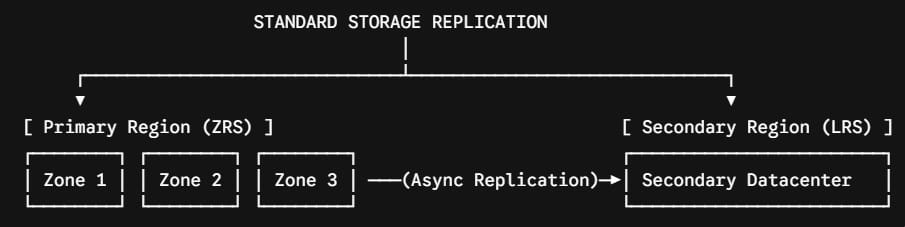
Standard Blob Storage Access Tiers
Standard Blob Storage enables lifecycle management policies by separating stored objects into distinct access tiers based on access frequency:
- Hot Tier: Optimized for data in active use, frequent reads, and modifications. Carries higher storage costs but lowest access/transaction fees.
- Cool Tier: Optimized for infrequently accessed data stored for at least 30 days (such as operational reports or weekly staging logs). Lower storage costs; higher read fees.
- Cold Tier: Designed for data accessed rarely and stored for at least 90 days. Offers significant storage cost reduction with higher read/retrieval costs.
- Archive Tier: Offline storage for long-term historical records and compliance retention (stored for at least 180 days). Lowest possible raw storage cost, requiring hours for data rehydration.
3. Azure Standard Networking: Load Balancers and Public IP Addresses
In modern Azure cloud architectures, the Standard Load Balancer and Standard Public IP represent the gold standard for secure, low-latency traffic distribution.
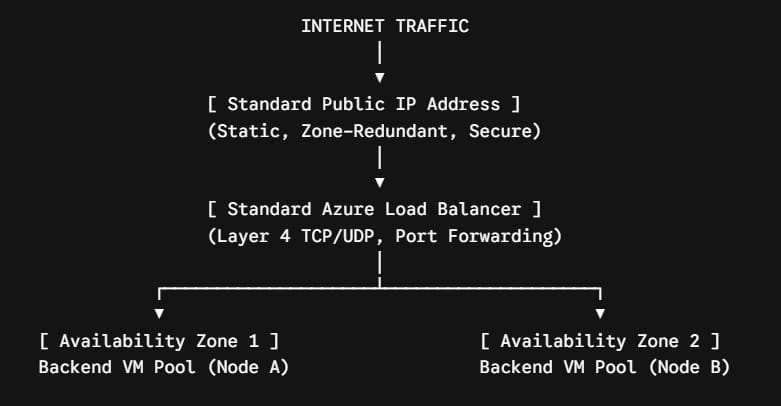
Key Differences Between Basic and Standard Load Balancers
Microsoft has actively transitioned organizations away from Basic network SKUs toward the Standard tier due to major security and architectural upgrades:
| Networking Feature | Basic SKU (Legacy) | Standard SKU (Production) |
|---|---|---|
| Backend Pool Capacity | Up to 300 instances (single VM set) | Up to 1,000+ instances across full VNets |
| Zone Redundancy | Non-zone aware | Zone-redundant, zonal, and cross-region |
| Default Security Model | Open by default (No NSG required) | Closed by default (Explicit NSG required) |
| SLA Guarantee | No SLA | 99.99% availability SLA |
| Monitoring & Metrics | Basic logs via Azure Storage | Multi-dimensional Azure Monitor metrics |
| HA Ports Configuration | Not Supported | Supported for NVA clusters |
The “Secure-by-Default” Standard Paradigm
A critical architectural distinction in the Standard network tier is its secure-by-default posture:
- A Basic Public IP allows inbound traffic unless an explicit Network Security Group (NSG) rule blocks it.
- A Standard Public IP and Standard Load Balancer block all inbound traffic by default. Traffic is permitted only if you explicitly associate a Network Security Group with rules allowing authorized traffic ports.
4. Azure Standard Messaging: Enterprise Service Bus and Event Hubs
For distributed cloud systems and decoupled microservices architectures, Azure Service Bus and Azure Event Hubs provide robust asynchronous communication. The Standard tier is where full enterprise messaging capabilities unlock.
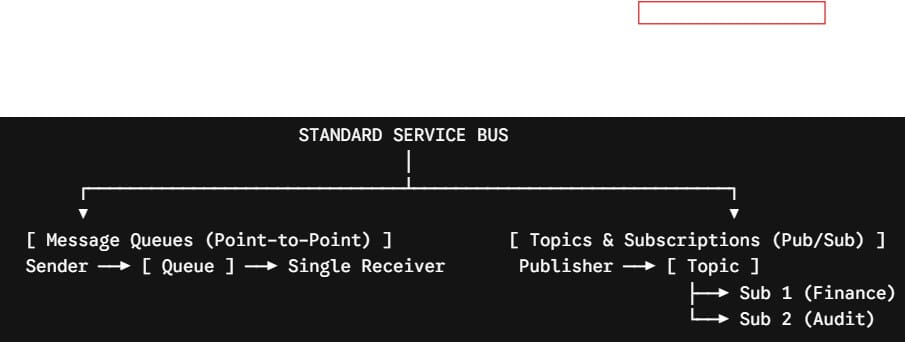
Core Capabilities of Standard Service Bus
- Publish/Subscribe Architecture (Topics & Subscriptions): While the Basic tier only permits 1-to-1 Point-to-Point Message Queues, the Standard tier unlocks Topics and Subscriptions. This allows a single event message to be evaluated and consumed independently by multiple microservice subscribers using SQL-based filter rules.
- Message Retention and Sizing: Standard supports message sizes up to 256 KB and retention periods up to 14 days.
- Dead-Lettering & Deduplication: Standard natively handles message deduplication over specified time windows and automatically routes poison messages to a dedicated Dead-Letter Queue (DLQ) for auditing.
- Transactions: Standard supports atomic multi-operation transactions within a single messaging construct.
5. Azure Standard Support Plans: Enterprise Operational Coverage
Beyond technical resource SKUs, Microsoft offers the Standard Support Plan, designed specifically for organizations running production workloads that require formal operational guarantees.
Comparing Developer, Standard, and Professional Direct Support
| Dimension | Developer Plan | Standard Plan | Professional Direct |
|---|---|---|---|
| Target Scope | Non-production / Evaluation | Production Workloads | Business-Critical Environments |
| Severity A (Critical) Response | No Severity A support | < 1 Hour | < 1 Hour (Priority Escalation) |
| Severity B (Moderate) Response | < 8 Hours (Business hours) | < 2 Hours (24/7) | < 2 Hours (24/7) |
| Severity C (Minimal) Response | < 8 Hours (Business hours) | < 4 Hours (24/7) | < 4 Hours (24/7) |
| Support Access Channels | Email only during business hrs | 24/7 Phone and Email access | 24/7 Phone, Email, & Web access |
| Architecture Guidance | None | General guidance | Consultative review by advisors |
The Standard support plan bridges the gap between basic developer experimentation and costly specialized enterprise advisory plans, giving operations teams direct 24/7 emergency escalation paths for critical infrastructure outages.
Cost Optimization: Getting the Most from the Standard Tier
1. Leverage Azure Reserved Instances (RIs)
For persistent workloads running Standard virtual machines and compute tiers over predictable 1-year or 3-year horizons, committing to Reserved Instances can reduce compute costs by up to 72% compared to Pay-As-You-Go pricing.
2. Implement Automated Storage Lifecycle Rules
Configure Azure Blob lifecycle management policies to transition unaccessed Standard Hot blobs to the Cool or Cold tier after 30 to 60 days of inactivity, and move compliance datasets to the Archive tier after 180 days:
3. Deploy Burstable B-Series VMs for Variable Workloads
For secondary domain controllers, internal tooling servers, and jump-boxes that experience intermittent usage spikes, deploy Standard B-Series burstable VMs rather than paying for constant high-clock compute nodes.
4. Enable Azure Hybrid Benefit
If your enterprise already licenses Windows Server or SQL Server on-premises with Software Assurance, apply the Azure Hybrid Benefit to your Standard VMs to avoid paying redundant OS licensing premiums in the cloud.
Architectural Decision Framework: When to Choose Standard
To determine whether your workloads should reside on the Standard tier versus Basic or Premium, use this decision framework:
When Standard Is the Correct Choice
- You are deploying public-facing websites, APIs, or enterprise line-of-business applications.
- Your service requires financial-backed SLAs, automated scaling, and cross-zone disaster recovery.
- You need standard Layer 4 load balancing with secure-by-default network boundaries.
- You are building event-driven microservices requiring Publish/Subscribe messaging topics.
When to Upgrade to Premium
- Your database engine (such as SQL Server, PostgreSQL, or Oracle) demands consistent single-digit or sub-millisecond disk read/write latency.
- Your messaging throughput requires dedicated hardware compute isolation to prevent “noisy neighbor” resource contention.
- Your architecture requires advanced enterprise networking features such as Global VNet Peering with extreme sustained throughput.
Summary Best Practices for Azure Standard
Follow this checklist to ensure your Azure Standard infrastructure is architected for maximum availability, security, and cost efficiency:
- Enforce Zone Redundancy: Always deploy Standard tier services across Availability Zones (ZRS for storage, Zone-Redundant for Load Balancers and VMs) to maximize uptime SLAs.
- Apply Network Security Groups (NSGs): Remember that Standard Public IPs and Load Balancers are closed by default; explicitly define granular NSG ingress and egress security rules.
- Automate Tier Shifting for Storage: Implement native Azure Storage Lifecycle management rules to continuously shift idle blobs from Hot to Cool, Cold, and Archive tiers.
- Match VM Types to Workloads: Distinguish between general-purpose (
Dsv5), memory-optimized (Esv5), and burstable (B-series) Standard compute sizes to prevent overprovisioning. - Monitor via Azure Monitor Metrics: Take advantage of multi-dimensional telemetry natively emitted by Standard tier networking and messaging services for proactive alerting.
- Establish Production Support: Ensure all mission-critical production subscriptions are backed by at least an Azure Standard Support agreement to guarantee 1-hour Severity-A incident response.
You may also like the following articles:
- Azure Stack Edge
- Azure Free Tier
- Azure Functions Dedicated Plan
- Azure Hybrid Benefit
- What is Azure Copilot
- Azure Migrate

I am Rajkishore, and I am a Microsoft Certified IT Consultant. I have over 14 years of experience in Microsoft Azure and AWS, with good experience in Azure Functions, Storage, Virtual Machines, Logic Apps, PowerShell Commands, CLI Commands, Machine Learning, AI, Azure Cognitive Services, DevOps, etc. Not only that, I do have good real-time experience in designing and developing cloud-native data integrations on Azure or AWS, etc. I hope you will learn from these practical Azure tutorials. Read more.