
Microsoft provides two distinct, enterprise-grade cloud desktop paths: Azure Virtual Desktop (AVD) and Windows 365 (Cloud PC). In this article, I will take you inside both platforms. We will analyze their underlying architectural philosophies, contrast operational workflows, evaluate their respective financial mechanics, and establish the definitive selection framework for your technical roadmap.
Azure Virtual Desktop vs Windows 365
Architectural Philosophies: Flexible Custom Infrastructure vs. Turnkey SaaS
To choose between these two solutions, you must look past the user interface and evaluate the underlying cloud management model. They represent two fundamentally different approaches to software delivery.
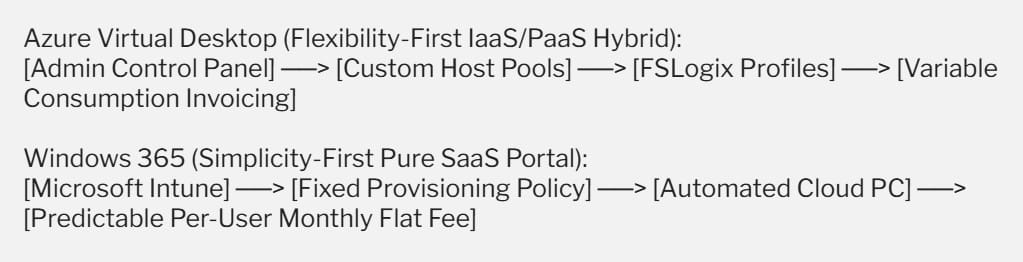
Azure Virtual Desktop: The Custom Infrastructure Engine
Azure Virtual Desktop operates as a consumption-based, highly customizable Infrastructure-as-a-Service (IaaS) and Platform-as-a-Service (PaaS) hybrid platform.
It provides raw virtualization components—such as session host virtual machines, connection brokers, gateways, and storage fabrics—and hands you the keys to design the architecture.
Your teams retain total, granular control over network routing, custom operating system images, storage performance tiers, and session density limits. It is engineered for specialized environments where flexibility and custom optimizations are paramount.
Windows 365: The Turnkey Cloud PC
Windows 365 treats the virtual desktop as a pure Software-as-a-Service (SaaS) utility, introducing the concept of a Cloud PC. Microsoft completely abstracts the cloud infrastructure backend. There are no virtual networks to manually configure, no compute host pools to monitor, and no storage accounts to scale.
Instead, a Cloud PC is provisioned instantly through Microsoft Intune based on a flat, per-user monthly subscription. It treats cloud desktops exactly like physical endpoints, integrating seamlessly into your existing unified endpoint management workflows with zero VDI complexity.
Technical Feature Comparison Matrix
| Capability Domain | Azure Virtual Desktop (AVD) | Windows 365 (Cloud PC) | Architectural Verdict |
| Service Classification | IaaS / PaaS Hybrid Platform. | Pure SaaS (Software-as-a-Service). | Complementary |
| Pricing Architecture | Variable consumption (Pay-as-you-go per minute/storage). | Fixed, predictable monthly fee per user license. | Windows 365 for predictability; AVD for high-density savings. |
| Administrative Console | Azure Portal, Azure Virtual Desktop blade, PowerShell. | Microsoft Intune admin center, windows365.microsoft.com. | Windows 365 for IT generalists; AVD for VDI specialists. |
| Desktop Allocation Profile | Supports Pooled (Multi-Session) and Personal desktops. | Strictly Personal (Dedicated One-to-One persistence). | AVD for shared pooling density. |
| Profile Management | Handled manually via FSLogix Profile Containers. | Fully automated and managed natively by Microsoft. | Windows 365 |
| Network Infrastructure | Requires Azure Virtual Network setup and routing control. | Offers Microsoft-hosted networks or hybrid Azure VNet links. | Windows 365 for simplicity. |
| Scaling & Automation | Requires custom autoscale scripts or Azure scaling plans. | Fully automated scaling based on assigned user licenses. | Windows 365 |
Structural Deep Dive: User Density and Profile Containers
High-Density Optimization with AVD Multi-Session
The single biggest architectural lever inside Azure Virtual Desktop is its exclusive access to Windows 10/11 Enterprise Multi-Session. This licensing capability allows your teams to host multiple independent users simultaneously on a single, powerful Azure virtual machine.
For instance, a pooled host cluster can pack 30 task workers onto a couple of large compute nodes, significantly lowering your overall cloud infrastructure costs.
Profile persistence across these fluid, non-persistent nodes is handled via FSLogix Profile Containers, where the user’s entire profile directory is stored as a virtual hard disk (.VHDX) on a high-speed network share and mounted to the assigned VM in real time during login.
Dedicated Persistence with Windows 365 Cloud PCs
Windows 365 abandons the concept of resource pooling and shared user sessions. Every assigned license maps to a dedicated, pers