
A junior engineer on one of my teams once ran a cleanup script against the wrong subscription. He had signed in days earlier, never checked which subscription was active, and the script started deleting “dev” resources in a shared environment. Nothing in the script was wrong. The problem was that nobody on the team understood what does az login do behind the scenes, or which context it leaves active.
The az login command is the front door to the Azure CLI. It proves who you are, collects the subscriptions you can reach, picks a default, and caches tokens on disk. This article walks through each of those steps, the login methods for humans and automation, and the mistakes I see most often in real projects. You will be able to sign in correctly, confirm your context, and choose a safer login method for scripts and pipelines.
What Does az login Do Step by Step?
The Azure CLI is a command-line tool that talks to Azure Resource Manager, the deployment and management layer for every Azure resource. Before Resource Manager accepts a command, it needs to know who is calling. If you are new to the tool itself, start with this overview of what the Azure CLI is.
When you run az login, four things happen in order:
- Authentication. The CLI sends you to Microsoft Entra ID, the identity service that signs users and apps in. You enter credentials, and Entra applies its policies, including MFA and Conditional Access.
- Token issuance. Entra returns a short-lived access token plus a refresh token. The CLI uses the refresh token to get new access tokens silently, as described in Microsoft’s Azure CLI authentication guidance.
- Subscription discovery. The CLI lists every subscription your identity can see across the tenant. A subscription is the billing and governance boundary for resources.
- Default context. The CLI saves one subscription as your default. Every later command runs against it unless you change it.
Note what az login does not do. It does not grant permissions. It only proves identity. What you can do afterward depends on your role assignments, which I cover later.
Pro Tip: In my experience, the biggest source of “it worked on my machine” Azure mistakes is the hidden default subscription. I run
az account showbefore any command that changes or deletes anything.
The Default Interactive Login
az loginAfter running the above command, it will ask to enter your Azure credentials as shown in the screenshot below.
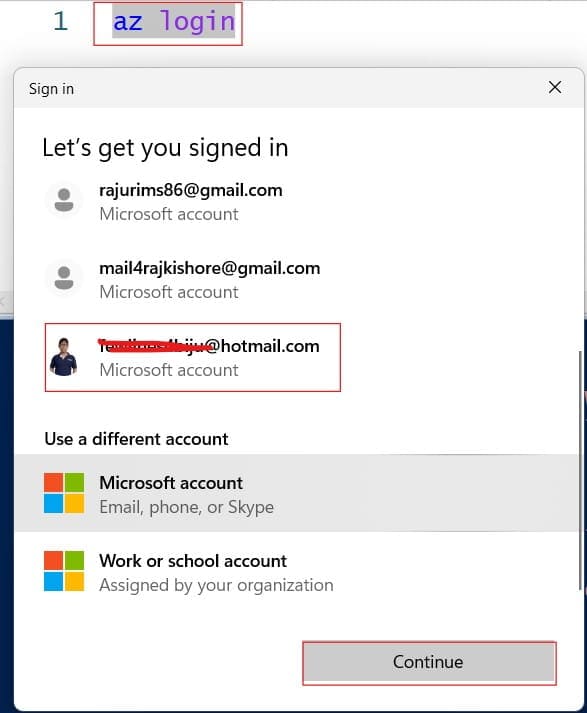
This command opens your default browser and starts an authorization code flow. If no browser is available, the CLI falls back to the device code flow. On Windows, recent CLI versions use Web Account Manager (WAM), a Windows component that brokers sign-ins, instead of a browser window.
After you sign in, the CLI prints a JSON list of subscriptions. If you have more than one, it may show a selector so you can pick a default. Your account name, tenant ID, and the isDefault flag appear in that output.
Since September 2025, Microsoft requires multifactor authentication for Azure CLI sign-ins by user identities. That change applies to people, not to service principals or managed identities. If a script used a username and password, it needs to move to a workload identity. You can read more on what MFA is if your team is still catching up.
Check Your Context After az login
Signing in is only half the job. You must confirm which tenant and subscription the CLI will use. A tenant is a dedicated Microsoft Entra directory that represents your organization. Here is what a tenant in Azure means in practice.
az account show --output tableaz account show prints the active subscription name, ID, tenant ID, and signed-in user. The --output table flag makes it easy to read. For field-level details, see this guide on az account show.
az account list --output tableThis lists every subscription your identity can reach. Use it when you work across several teams. The az account list reference covers