
What is Azure Copilot

A common question: “What is Azure Copilot, and how will it change the way my team manages cloud infrastructure?” In this article, I will break down what Azure Copilot is, its key enterprise capabilities, and a practical step-by-step tutorial on how to harness its power in your day-to-day operations.

What is Azure Copilot

Understanding Microsoft Copilot for Azure

At its core, Azure Copilot is an enterprise-grade AI assistant integrated into the Azure ecosystem. Powered by advanced Large Language Models (LLMs) combined with the deep context of the Azure Control Plane (Azure Resource Manager), Azure Copilot translates natural language requests into actionable cloud commands, queries, and resource configurations.

Rather than spending hours sifting through documentation, writing complex Kusto Query Language (KQL) scripts, or searching through portal menus, cloud engineers can simply state their intent in plain English.

Plaintext

"Show me all unattached managed disks in my production subscription and estimate my monthly cost savings if I delete them."

Azure Copilot synthesizes your environment’s real-time metadata, applies security policies, and delivers exact, contextual answers with execution options.

How Azure Copilot Works: The Under-the-Hood Architecture

To appreciate the authority and reliability of Azure Copilot, it helps to understand how it processes your prompts. It does not operate as a generic chatbot guessing cloud configurations; it operates in direct harmony with your subscription’s security context.
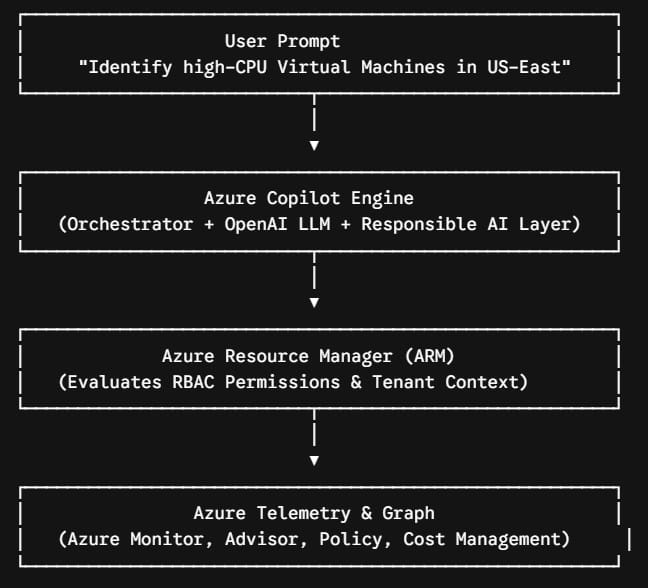
what is azure copilot

Key Architectural Pillars

  1. Role-Based Access Control (RBAC) Enforcement: Azure Copilot strictly respects your organization’s existing Azure RBAC permissions. If a junior developer does not have permission to delete a Virtual Machine, Azure Copilot will not allow them to perform that action through the chat interface.
  2. Contextual Awareness: The engine evaluates your current portal context—including your selected subscription, resource group, and active workspace—to deliver hyper-relevant responses.
  3. Control Plane Integration: Azure Copilot interfaces directly with Azure Resource Manager (ARM), Azure Resource Graph, Azure Advisor, and Azure Monitor.
  4. Data Privacy Guardrails: Your prompt history and internal resource configuration data are isolated within your enterprise boundary. They are never used to train global public foundational models.

Core Features and Key Capabilities

Whether you are designing new landing zones or operating scale-out Kubernetes clusters, Azure Copilot delivers value across the entire Cloud Development Life Cycle (CDLC).

1. Architectural Guidance and Service Selection

Navigating over 200 Azure services can lead to decision paralysis. Copilot analyzes your stated workload requirements—such as target latency, compliance mandates (HIPAA, SOC 2), and scaling profiles—and recommends optimal architecture blueprints aligned with the Microsoft Azure Well-Architected Framework.

2. Infrastructure as Code (IaC) Generation

Instead of writing Bicep templates or Terraform configurations from scratch, you can instruct Azure Copilot to draft deployment specs. It formats clean, syntax-valid code tailored to your naming conventions and tagging strategies.

3. Log Analytics and KQL Script Synthesis

Debugging cloud issues usually requires querying Azure Monitor Log Analytics using Kusto Query Language (KQL). Azure Copilot converts plain text incident descriptions directly into valid KQL queries, reducing Mean Time to Resolution (MTTR) dramatically.

4. Financial Operations (FinOps) Optimization

By querying Azure Cost Management and Azure Advisor, Copilot highlights cost anomalies, underutilized resources, reservation opportunities, and right-sizing recommendations.

Feature Summary Matrix

Capability AreaManual ApproachAzure Copilot ApproachPrimary Benefit
Resource DiscoveryManual navigation across portal pages or custom Resource Graph queries.Single natural language prompt asking for specific asset states.90% faster resource inventory discovery.
TroubleshootingHand-crafted KQL log queries and manual metrics correlation.Automated log analysis and plain-text query generation.Reduced MTTR during critical outages.
IaC AuthoringSearching documentation and drafting complex JSON/Bicep syntax manually.Natural language to Bicep/Terraform generation.Accelerated deployment cycles and standardized code.
FinOps & Cost ManagementExporting spreadsheets and sifting through cost analysis charts.Instant cost-saving recommendations and anomaly explanations.Proactive cloud spending reduction.

Step-by-Step Tutorial: Mastering Azure Copilot in Your Operations

Step 1: Launching the Copilot Experience

  1. Log in to the Azure Portal (portal.azure.com).
  2. Locate the Copilot icon in the main top navigational bar (adjacent to the Cloud Shell icon).
  3. Click the icon to open the docked Azure Copilot Side Pane, which remains persistent as you navigate across different Azure service pages. Check out the screenshot below for your reference.
azure copilot what is it

Step 2: Formulating Effective Prompts

To receive high-precision outputs, structure your prompts using the C-A-C Framework (Context, Action, Constraint):

  • Weak Prompt: “Fix my app service.”
  • Structured Prompt: “As a Cloud Admin [Context], analyze the HTTP 5xx error trends for App Service ‘app-billing-prod-uswest’ over the last 4 hours [Action], and summarize the root cause without modifying any application settings [Constraint].”

Step 3: Generating Infrastructure as Code (IaC)

When tasked with deploying a secure storage account with standard encryption and network restrictions, ask Copilot:

Copilot provides the validated code snippet directly inside the chat interface, complete with a Copy Code option or an direct button to open the template in the Azure Template Deployment view.

Step 4: Running Diagnostic Inspections

During performance degradation events, leverage Copilot to write real-time log queries:

“Write a KQL query to analyze Azure Kubernetes Service (AKS) pod restart counts in my ‘eastus-prod-cluster’ for the last 24 hours grouped by namespace.”

Copilot returns the exact KQL code. With a single click, you can execute the query directly in Azure Monitor Log Analytics.

Step 5: Applying Cost Optimization Recommendations

Keep cloud sprawl in check by making FinOps review a weekly routine:

“Identify all unattached public IP addresses and stopped-but-allocated Virtual Machines across my US region subscriptions, and estimate my monthly waste.”

Copilot summarizes the resource list in a clean table and offers direct navigation links to remediate those resources safely.

Enterprise Security, Compliance, and Data Privacy

When deploying AI tools in enterprise environments—especially in regulated sectors like financial services, healthcare, and retail—data protection is paramount. Microsoft has implemented strict enterprise guardrails around Azure Copilot:

  • Data Isolation: Prompts, context data, and generated responses stay strictly within your tenant boundary.
  • No External Model Training: Customer enterprise data is never used to train base foundation models.
  • Compliance Standards: Azure Copilot complies with Microsoft’s Responsible AI Principles, meeting rigorous standards for privacy, security, and ethical AI deployment.
  • Explicit Action Confirmation: While Copilot can draft commands and arm templates, critical mutations (such as resource deletion, stopping services, or changing IAM permissions) require explicit user confirmation before execution.

Best Practices for Azure Copilot

To ensure your organization achieves maximum productivity gain while maintaining governance, follow these best practices:

  1. Implement Principle of Least Privilege (PoLP): Because Azure Copilot relies on the user’s RBAC rights, audit user roles regularly. Copilot is only as restricted as the permissions assigned to the logged-in identity.
  2. Combine Copilot with Policy Enforcement: Use Azure Policy alongside Azure Copilot. Copilot helps you author compliant resources, while Azure Policy enforces non-negotiable guardrails across subscriptions.
  3. Train Engineers on Prompt Structure: Educate your team on providing context, constraints, and explicit parameters in prompts to reduce iterative back-and-forth queries.
  4. Review Before Execution: Treat AI-generated Infrastructure as Code and administrative scripts as recommendations. Always perform peer code reviews before applying templates in production environments.

Final Thoughts

Microsoft Copilot for Azure represents a fundamental shift in how cloud computing platforms are operated. By bridging natural language interaction with the powerful orchestration capabilities of the Azure Control Plane, it allows engineering teams to move away from tedious administrative overhead and focus on high-value architectural innovation.

You may also like the following articles:

Azure Virtual Machine

DOWNLOAD FREE AZURE VIRTUAL MACHINE PDF

Download our free 25+ page Azure Virtual Machine guide and master cloud deployment today!