
Let us discuss the Microsoft Azure portal app download option and how to install the Azure portal app.
Azure portal app
- Azure portal app is a new application introduced by Microsoft that helps you to access and manage all your Azure resources differently.
- The Windows operating system currently supports this.
- This is a desktop application for the Azure portal. The performance of this application is really good.
Download Azure Portal App
To start with the installation, the First step is to open the below site to download the app
https://portal.azure.com/App/DownloadOnce the above website opens, click on the Download the Azure Portal app button to download the AzurePortalInstaller.exe file.

How to install Azure portal app
Run the AzurePortalInstaller.exe file to install the Azure portal App. Once the app is successfully installed, you can search for that from your Start menu.
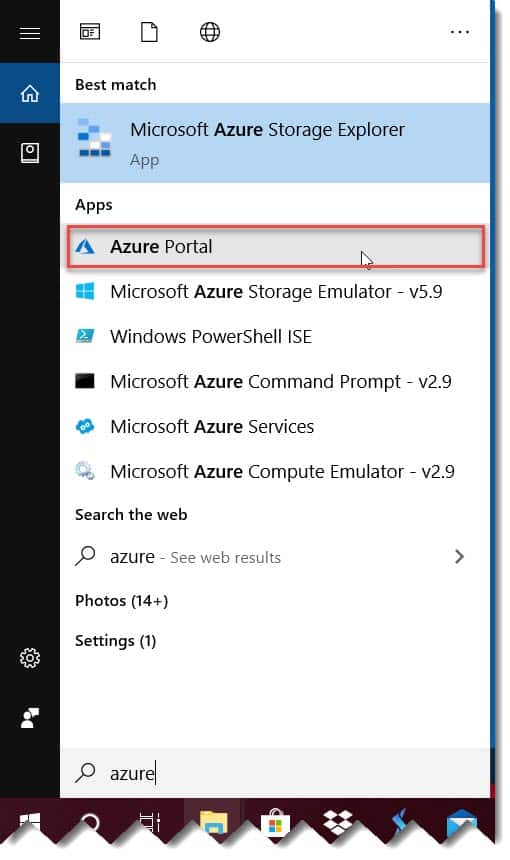
Click on that. It will ask you to enter the Azure credentials. Enter the credentials and click on the Sign in button.

After the login, you can able to see the Azure Portal App. It will be similar to the Azure Portal web. Now, you can explore all the options in the Azure Portal App.

You can view and manage all the applications in this Azure portal app, including web apps, databases, virtual machines, virtual networks, storage, etc.
This is the right option for your daily activities in Azure Portal. It will be a quick option for you with high performance.
You can also check out An introduction to Microsoft Azure Portal
Conclusion
This article discussed all the Microsoft Azure portal app, how to download the Microsoft Azure portal app, and the installation steps. Thanks for reading this article !!!

I am Rajkishore, and I am a Microsoft Certified IT Consultant. I have over 14 years of experience in Microsoft Azure and AWS, with good experience in Azure Functions, Storage, Virtual Machines, Logic Apps, PowerShell Commands, CLI Commands, Machine Learning, AI, Azure Cognitive Services, DevOps, etc. Not only that, I do have good real-time experience in designing and developing cloud-native data integrations on Azure or AWS, etc. I hope you will learn from these practical Azure tutorials. Read more.