
If your organization is running non-critical, interruptible workloads, you may be looking for potential savings. I’m talking about Azure Spot Virtual Machines (VMs). By tapping into Azure’s unused capacity, you can achieve up to a 90% discount compared to standard pay-as-you-go rates. In this article, I’m going to walk you through exactly what they are, when to use them, and how to deploy them like a pro.
Azure Spot VM
What is an Azure Spot VM?
To understand a Spot VM, you have to understand how Microsoft manages its data centers in regions like East US or West US 2. To ensure that every “standard” customer can spin up a server instantly, Microsoft maintains a massive surplus of hardware.
Instead of letting that hardware sit idle, Microsoft rents it out at a massive discount. The catch? It’s interruptible. If a full-paying customer needs that capacity, Azure will give you a 30-second notice and evict your VM.
Spot VM vs. Standard VM: The Breakdown
| Feature | Standard (Pay-As-You-Go) | Azure Spot VM |
| Pricing | Fixed hourly rate | Up to 90% discount |
| Availability | 99.9% to 99.99% SLA | No SLA (Interruptible) |
| Best Use Case | Production, Web Servers | Batch jobs, Dev/Test, AI training |
| Eviction Notice | N/A | 30 Seconds |
Strategic Use Cases
I strictly recommend Spot VMs for “disposable” or “stateless” workloads. If your application can’t handle a sudden reboot, do not put it on Spot.
- Batch Processing: Ideal for a logistics company running nightly route optimizations. If the VM is evicted, the job simply restarts when capacity is available.
- AI and Machine Learning: US tech firms are currently using Spot VMs for large-scale model training. Since these jobs often use “checkpoints,” an eviction only loses a few minutes of progress.
- CI/CD Build Agents: Development teams often use Spot VMs to run their automated test suites. It’s a low-cost way to run hundreds of parallel tests.
- Visual Rendering: Animation studios leverage Spot capacity for massive frame-rendering tasks, saving thousands of dollars per project.
The deployment starts in the standard Azure Portal, but there is one specific “fork in the road” that determines your savings.
- Sign in to the Azure Portal.
- Search for Virtual Machines in the top search bar.
- Click Create > Azure virtual machine.
- Select your Subscription and Resource Group (e.g.,
Prod-Data-RG). Check out the screenshot below for your reference.
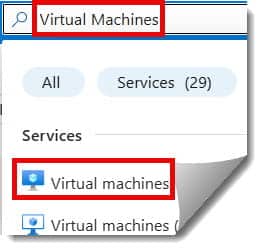
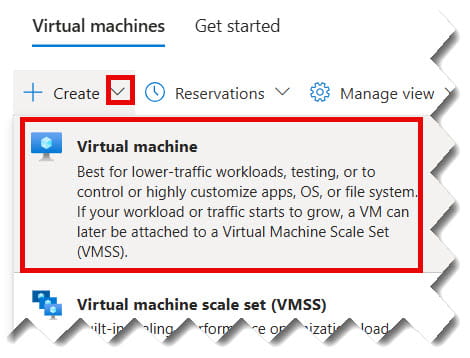
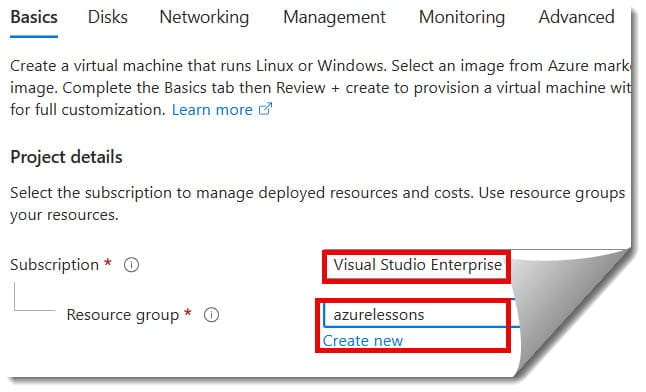
Choosing the Right US Region
Not all regions have the same surplus. For example, East US might be “expensive” during New York business hours, while West US 2 (Washington) might have deep discounts. Always check the Pricing History tool (more on that below).
Step 2: Enabling the Spot Discount
Under the Basics tab, locate the Instance details section.
- Find the checkbox for Azure Spot instance.
- Select Yes.
- This will expand the Eviction type and Eviction policy options. Check out the screenshot below for your reference.
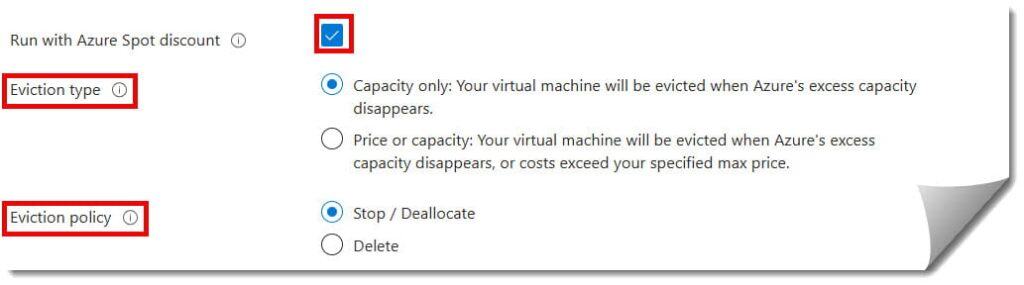
Step 3: Configuring Eviction Types and Policies
This is the most technical part of the setup. If you get this wrong, you might lose more than just a VM—you might lose your data.
Eviction Type: Capacity vs. Price
- Capacity Only (Recommended): Your VM is only evicted if Azure physically needs the hardware. You pay the current Spot price (capped at the standard rate). This is the “stickiest” option.
- Price or Capacity: You set a “Max Price” (e.g.,
$0.08/hr). If the market price in your region hits$0.09/hr, your VM is evicted even if capacity is available.
Eviction Policy: Deallocate vs. Delete
- Stop / Deallocate: The VM stops, but the disk and network interface remain. You stop paying for compute, but you still pay for storage. You can restart it manually later.
- Delete: Everything is wiped. This is the cleanest option for stateless workloads where your code is in GitHub, and your data is in a SQL database or Blob Storage.
Step 4: The “Pricing History” Tool
Before you hit “Review + Create,” look for the link that says View pricing history and compare prices in nearby regions.
- Look for low Eviction Rates: Azure will show you a percentage (e.g., 0–5%, 5–10%).
- Pro Tip: If
East UShas a 20% eviction rate, butNorth Central US(Illinois) has 0–5%, move your deployment there. The latency difference is negligible for a batch job, but the stability is far higher.
Step 5: Finalizing Networking and Security
A Spot VM is still a VM. You must secure it with the same rigor as a production server.
- Networking: Ensure your Network Security Group (NSG) rules are tight. For US-based teams, I recommend using Azure Bastion instead of opening Port 3389 (RDP) or Port 22 (SSH) to the public internet.
- Management: Enable Auto-shutdown. While Spot VMs are cheap, you don’t want them running over the weekend if your dev team is offline.
- Monitoring: Go to the Monitoring tab and enable Boot Diagnostics. It’s the only way to see what went wrong if an eviction causes a crash.
Step 6: Handling the 30-Second Notice
Azure provides Scheduled Events via a metadata service reachable from inside the VM at 169.254.169.254. I always recommend my clients run a small “listener” script. When the eviction signal is sent:
- The script triggers a “Save” or “Checkpoint” for the app.
- It gracefully closes database connections.
- It sends a notification to a Slack or Microsoft Teams channel saying, “Spot VM 01 is going down in 30 seconds.”
Best Practices for 90% Savings
To successfully manage Spot VMs at scale, follow these “Architect’s Rules”:
- Mix Spot and Standard: Use Virtual Machine Scale Sets (VMSS) with a “Spot Priority Mix.” You can have 2 “Standard” VMs for baseline stability and 8 “Spot” VMs to handle the heavy lifting.
- Use the -1 Price Cap: When setting your Max Price, entering
-1tells Azure: “I will pay any price up to the standard Pay-As-You-Go rate.” This keeps you alive through price spikes and only evicts you for actual capacity needs. - Stateless is King: Store your data in Azure SQL or Azure Data Lake. The VM should be a “throwaway” engine that pulls work from a queue and puts results in a permanent store.
Summary of Key Takeaways
| Step | Action | Key Benefit |
| 1. Regional Check | Compare US regions for lowest eviction rates. | Maximum stability. |
| 2. Eviction Type | Select “Capacity Only” for most dev/test. | Predictable lifecycle. |
| 3. Policy Choice | Use “Delete” for pure stateless automation. | Zero “garbage” costs left behind. |
| 4. Metadata Service | Monitor the 30-second warning. | Prevent data loss. |
Conclusion:
The Azure Spot VM is more than just a “discount server”—it is a sophisticated tool for the modern, cost-conscious enterprise. Whether you are a startup or a healthcare giant, the ability to slash your compute bill by 90% changes the math of what you can build.
By following the steps I’ve outlined—focusing on region selection, eviction triggers, and automated monitoring—you aren’t just saving money; you are building a resilient, high-performance architecture in the cloud.
You may also like the following articles:

I am Rajkishore, and I am a Microsoft Certified IT Consultant. I have over 14 years of experience in Microsoft Azure and AWS, with good experience in Azure Functions, Storage, Virtual Machines, Logic Apps, PowerShell Commands, CLI Commands, Machine Learning, AI, Azure Cognitive Services, DevOps, etc. Not only that, I do have good real-time experience in designing and developing cloud-native data integrations on Azure or AWS, etc. I hope you will learn from these practical Azure tutorials. Read more.