
When it comes to provisioning serverless compute, the Azure CLI command az functionapp create is our most powerful tool. In this article, I’ll walk you through how to master this command, ensuring your infrastructure deployments are repeatable, secure, and production-ready.
az functionapp create
What is az functionapp create and Why Does It Matter?
At its core, az functionapp create is the command-line interface tool used to provision the environment required to host your serverless logic. Unlike traditional server-based deployments where you manage the OS, Azure Functions allows us to focus purely on the event-driven code.
When we run this command, we are essentially defining the backbone of our serverless application:
- The Hosting Plan: Defining where the compute lives (Consumption, Premium, or Dedicated).
- The Runtime: Configuring the language stack (C#, Python, Node.js, etc.).
- The Storage Binding: Connecting the function app to the required Azure Storage account for state and management.
Prerequisites:
Before we execute the creation command, we must ensure our Azure environment is prepared.
| Requirement | Description | Best Practice |
| Azure CLI | The core tool installed on your local machine. | Keep it updated to the latest version. |
| Resource Group | The container for all related resources. | Use a descriptive naming convention (e.g., rg-app-production-us-001). |
| Storage Account | Required for persistent storage of your code. | Use Standard_LRS for basic needs or Standard_GRS for redundancy. |
The Anatomy of the Creation Command
To write authoritative scripts, you must understand the parameters. I prefer using the standard syntax in my CI/CD pipelines to ensure consistency.
Basic Syntax
Bash
az functionapp create \
  --name <App_Name> \
  --storage-account <Storage_Account_Name> \
  --resource-group <Resource_Group_Name> \
  --consumption-plan-location <Location> \
  --runtime <Runtime_Stack> \
  --functions-version 4
Key Parameters Breakdown
--name: Must be globally unique within theazurewebsites.netdomain.--storage-account: The storage account provides the necessary metadata and logging capabilities.--consumption-plan-location: This defines the region, such aseastusorwestus2.--runtime: Defines your stack. Common options includedotnet,python,node, andjava.
Selecting the Right Hosting Plan
One of the most important decisions I make as an architect is selecting the hosting plan. This isn’t just about cost; it’s about performance requirements.
Comparison Table for Hosting Plans
| Plan Type | Best For | Scaling Behavior |
| Consumption | Variable/Unpredictable traffic. | Scales automatically to zero when idle. |
| Premium | Low latency and heavy workloads. | Always-ready instances; no cold starts. |
| App Service | High-density or complex network needs. | Dedicated compute resources provided. |
- For the Consumption Plan: The
--consumption-plan-locationparameter is used. - For the App Service/Premium Plan: You must provide the
--planparameter.
Step-by-Step Tutorial: Creating Your First Azure Function App
Let’s look at how I would deploy an application for a client. We’ll assume a standard Python-based web API service.
Step 1: Authentication
Before running any commands, authenticate to your Azure tenant:
Bash
az loginStep 2: Resource Preparation
I always suggest creating the infrastructure in a specific order to avoid dependency errors.
- Create the Resource Group:
az group create -n rg-production-us -l eastus - Create the Storage Account:
az storage account create -n strgprodus001 -g rg-production-us -l eastus --sku Standard_LRS
Example:
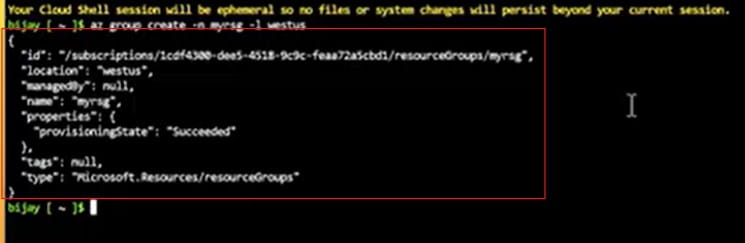
az group create -n myrsg -l westus

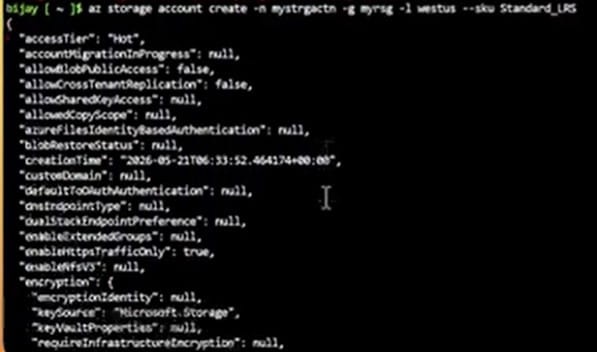
az storage account create -n mystrgactn -g myrsg -l westus --sku Standard_LRS
After executing the command above, I received the expected output, as shown in the screenshot below.
Step 3: Executing the Function App Creation
Once the prerequisites are ready, we deploy the app:
Bash
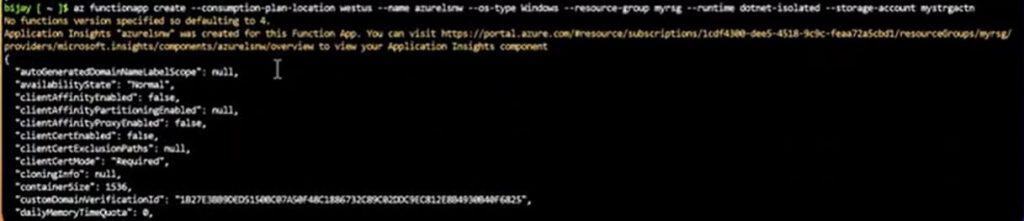
az functionapp create --consumption-plan-location westus --name azurelsnw --os-type Windows --resource-group myrsg --runtime dotnet-isolated --storage-account mystrgactn --functions-version 4After executing the command above, I received the expected output. The Azure function app has been created successfully, as shown in the screenshot below.
Pro-Tips for Production Environments
Here is how you can elevate your deployment to enterprise standards:
1. Enable Monitoring via App Insights
Never deploy a production application without observability. You can enable Application Insights during creation by adding the --app-insights parameter. This allows you to track execution logs, failures, and cold starts in real-time.
2. Managed Identities
Instead of hardcoding connection strings in your settings, use Managed Identities. This is the modern, secure way to allow your Function App to access storage and databases without storing credentials in your local.settings.json.
3. Versioning Matters
Always specify --functions-version 4. Older versions are being phased out, and version 4 offers the best performance and security updates for modern runtimes.
Troubleshooting Common Deployment Failures
- Naming Collisions: If your app name is taken, the command will fail. Always prefix your names with a unique identifier or company acronym.
- Region Mismatches: Ensure your storage account and your Function App reside in the same Azure region. Cross-region traffic can introduce latency and potential authorization issues.
- Runtime Version Compatibility: If you are using Python, ensure that the version you are developing with locally matches the version you are targeting in the Azure deployment.
Video Tutorials:
Final Thoughts:
Mastering az functionapp create is the first step toward building a robust cloud infrastructure. By understanding the parameters, selecting the right hosting plans, and following best practices like using Managed Identities and enabling App Insights, you are setting yourself up for a highly scalable, secure, and manageable serverless environment.
You may also like the following articles:
- How to Avoid Cold Start in Azure Functions
- Azure How Many Functions In One Function App
- How To Access Azure Functions wwwroot Folder

I am Rajkishore, and I am a Microsoft Certified IT Consultant. I have over 14 years of experience in Microsoft Azure and AWS, with good experience in Azure Functions, Storage, Virtual Machines, Logic Apps, PowerShell Commands, CLI Commands, Machine Learning, AI, Azure Cognitive Services, DevOps, etc. Not only that, I do have good real-time experience in designing and developing cloud-native data integrations on Azure or AWS, etc. I hope you will learn from these practical Azure tutorials. Read more.