
Microsoft provides two distinct, enterprise-grade cloud desktop paths: Azure Virtual Desktop (AVD) and Windows 365 (Cloud PC). In this article, I will take you inside both platforms. We will analyze their underlying architectural philosophies, contrast operational workflows, evaluate their respective financial mechanics, and establish the definitive selection framework for your technical roadmap.
Table of Contents
- Azure Virtual Desktop vs Windows 365
- Architectural Philosophies: Flexible Custom Infrastructure vs. Turnkey SaaS
- Azure Virtual Desktop: The Custom Infrastructure Engine
- Windows 365: The Turnkey Cloud PC
- Technical Feature Comparison Matrix
- Structural Deep Dive: User Density and Profile Containers
- Administrative Workflows: VDI Specialist vs. IT Generalist
- The AVD Administrative Footprint
- The Windows 365 Administrative Footprint
- Financial Architecture: Consumption-Based vs. Fixed Subscription
- Step-by-Step Strategic Selection Framework
- Summary
Azure Virtual Desktop vs Windows 365
Architectural Philosophies: Flexible Custom Infrastructure vs. Turnkey SaaS
To choose between these two solutions, you must look past the user interface and evaluate the underlying cloud management model. They represent two fundamentally different approaches to software delivery.
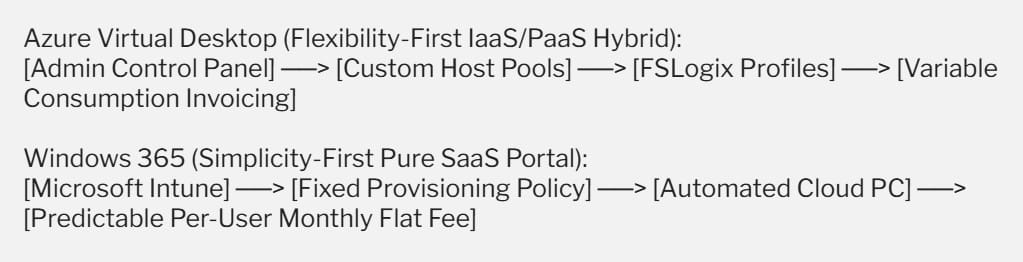
Azure Virtual Desktop: The Custom Infrastructure Engine
Azure Virtual Desktop operates as a consumption-based, highly customizable Infrastructure-as-a-Service (IaaS) and Platform-as-a-Service (PaaS) hybrid platform.
It provides raw virtualization components—such as session host virtual machines, connection brokers, gateways, and storage fabrics—and hands you the keys to design the architecture.
Your teams retain total, granular control over network routing, custom operating system images, storage performance tiers, and session density limits. It is engineered for specialized environments where flexibility and custom optimizations are paramount.
Windows 365: The Turnkey Cloud PC
Windows 365 treats the virtual desktop as a pure Software-as-a-Service (SaaS) utility, introducing the concept of a Cloud PC. Microsoft completely abstracts the cloud infrastructure backend. There are no virtual networks to manually configure, no compute host pools to monitor, and no storage accounts to scale.
Instead, a Cloud PC is provisioned instantly through Microsoft Intune based on a flat, per-user monthly subscription. It treats cloud desktops exactly like physical endpoints, integrating seamlessly into your existing unified endpoint management workflows with zero VDI complexity.
Technical Feature Comparison Matrix
| Capability Domain | Azure Virtual Desktop (AVD) | Windows 365 (Cloud PC) | Architectural Verdict |
| Service Classification | IaaS / PaaS Hybrid Platform. | Pure SaaS (Software-as-a-Service). | Complementary |
| Pricing Architecture | Variable consumption (Pay-as-you-go per minute/storage). | Fixed, predictable monthly fee per user license. | Windows 365 for predictability; AVD for high-density savings. |
| Administrative Console | Azure Portal, Azure Virtual Desktop blade, PowerShell. | Microsoft Intune admin center, windows365.microsoft.com. | Windows 365 for IT generalists; AVD for VDI specialists. |
| Desktop Allocation Profile | Supports Pooled (Multi-Session) and Personal desktops. | Strictly Personal (Dedicated One-to-One persistence). | AVD for shared pooling density. |
| Profile Management | Handled manually via FSLogix Profile Containers. | Fully automated and managed natively by Microsoft. | Windows 365 |
| Network Infrastructure | Requires Azure Virtual Network setup and routing control. | Offers Microsoft-hosted networks or hybrid Azure VNet links. | Windows 365 for simplicity. |
| Scaling & Automation | Requires custom autoscale scripts or Azure scaling plans. | Fully automated scaling based on assigned user licenses. | Windows 365 |
Structural Deep Dive: User Density and Profile Containers
High-Density Optimization with AVD Multi-Session
The single biggest architectural lever inside Azure Virtual Desktop is its exclusive access to Windows 10/11 Enterprise Multi-Session. This licensing capability allows your teams to host multiple independent users simultaneously on a single, powerful Azure virtual machine.
For instance, a pooled host cluster can pack 30 task workers onto a couple of large compute nodes, significantly lowering your overall cloud infrastructure costs.
Profile persistence across these fluid, non-persistent nodes is handled via FSLogix Profile Containers, where the user’s entire profile directory is stored as a virtual hard disk (.VHDX) on a high-speed network share and mounted to the assigned VM in real time during login.
Dedicated Persistence with Windows 365 Cloud PCs
Windows 365 abandons the concept of resource pooling and shared user sessions. Every assigned license maps to a dedicated, persistent, One-to-One virtual machine. When a user logs out, their data remains intact on their assigned virtual drive, exactly like a local physical computer.
Because these machines are fully isolated, you avoid “noisy neighbor” scenarios—where one user running an intensive query impacts the performance of every other user on that shared node.
Profile management is entirely automated behind the scenes, eliminating the need for your systems administrators to size, patch, or maintain external FSLogix storage shares.
Administrative Workflows: VDI Specialist vs. IT Generalist
The operational footprint of your desktop virtualization strategy depends heavily on your IT department’s existing skill sets.

The AVD Administrative Footprint
Managing Azure Virtual Desktop requires specialized cloud engineering skills. Your systems team must understand Azure Resource Manager (ARM) templates, configure network security groups, maintain custom master images (golden images) via the Azure Compute Gallery, and analyze diagnostic telemetry through Azure Log Analytics.
It is a highly powerful framework but demands dedicated, continuous engineering oversight to run efficiently.
The Windows 365 Administrative Footprint
Windows 365 eliminates traditional VDI management silos. Because the platform is fully integrated with Microsoft Intune, an IT generalist who manages physical laptops can manage your entire Cloud PC estate using the exact same interface.
You deploy corporate applications, apply security baselines, push Windows updates, and evaluate device compliance using standard Intune group policies. The cloud machine is treated simply as an additional endpoint object in your corporate directory inventory.
Financial Architecture: Consumption-Based vs. Fixed Subscription
Predicting and tracking your cloud budget is a critical component of a sustainable virtualization strategy. The financial mechanics of these two systems are fundamentally distinct.
The Azure Virtual Desktop Billing Profile
AVD uses a consumption-based pricing model. You pay for the precise runtime of the virtual machines, the active capacity of your storage accounts, and outbound network data transfers.
- This structure allows for significant financial optimization if you implement aggressive scaling plans—such as using automated scaling tools to shut down 90% of your host pool nodes during evenings and weekends when employees are offline.
- However, if a development team accidentally leaves a cluster of high-performance, GPU-heavy VMs running continuously over a long holiday weekend, your monthly invoice will reflect that full runtime.
The Windows 365 Billing Profile
Windows 365 relies entirely on a predictable subscription framework. Microsoft bills you a flat monthly fee per user license, determined strictly by the vCore, RAM, and storage allocation profile you select (e.g., 2 vCPUs, 8 GB RAM, 128 GB Storage).
It does not matter if a user leaves their Cloud PC running 24 hours a day, seven days a week, or if they download massive corporate data payloads; your invoice remains exactly the same. This predictable cost model makes budget forecasting simple for corporate procurement teams.
Step-by-Step Strategic Selection Framework
To help your technology leadership choose the ideal cloud desktop framework for your operational roadmap, follow this systematic evaluation sequence:
1. Evaluate Your User Workload Profiles and Density Requirements:
Analyze the daily operational patterns of your workforce. If your user base consists of high-density shifts (such as call centers, customer support teams, or data entry clerks who can share pooled compute nodes efficiently), prioritize Azure Virtual Desktop to leverage multi-session cost density.
2. Audit Your Internal IT Administrative Capabilities and Toolsets:
Evaluate your existing endpoint management team. If your department doesn’t have dedicated cloud virtualization engineers but has a strong handle on Microsoft Intune, choose Windows 365 to seamlessly integrate cloud desktops into your existing device pipelines.
3. Map Network Routing and Granular Configuration Needs:
Review your infrastructure parameters. If your applications require highly specialized network topologies, complex multi-monitor configurations, or deep integration with custom bare-metal architectures, select Azure Virtual Desktop for its unrestricted design flexibility.
Summary
Both cloud desktop solutions are elite, production-grade environments capable of driving your modern workspace transformation strategy.
- Choose Azure Virtual Desktop (AVD) if you require an optimized, highly flexible VDI framework that leverages Windows 11 Multi-Session density, gives you complete control over your network routing topology, and allows you to dynamically scale compute spend based on minute-by-minute consumption.
- Choose Windows 365 if you want a simple, turnkey SaaS solution that delivers a dedicated, persistent Cloud PC for a predictable monthly cost, integrates completely into Microsoft Intune, and can be easily managed by your existing IT operations generalists without specialized virtualization overhead.
You may also like the following articles:
- Azure Virtual Desktop Client
- How to restart Azure Virtual Desktop
- AWS Workspaces VS Azure Virtual Desktop

I am Rajkishore, and I am a Microsoft Certified IT Consultant. I have over 14 years of experience in Microsoft Azure and AWS, with good experience in Azure Functions, Storage, Virtual Machines, Logic Apps, PowerShell Commands, CLI Commands, Machine Learning, AI, Azure Cognitive Services, DevOps, etc. Not only that, I do have good real-time experience in designing and developing cloud-native data integrations on Azure or AWS, etc. I hope you will learn from these practical Azure tutorials. Read more.
