
In this article, I will break down the exact billing mechanics of Azure DocumentDB pricing, analyze its performance tiers, and map out proven cost-optimization strategies to keep your deployments highly efficient.
Azure DocumentDB Price
The Core Billing Engine: The Predictable Compute + Storage Model
Unlike traditional cloud NoSQL platforms that use complex, variable request-unit metrics that bounce around with every query, Azure DocumentDB uses a highly predictable Compute + Storage architecture.
This means you don’t have to guess how many database resources a specific API call consumes; you pay for the exact infrastructure blocks you choose to provision.
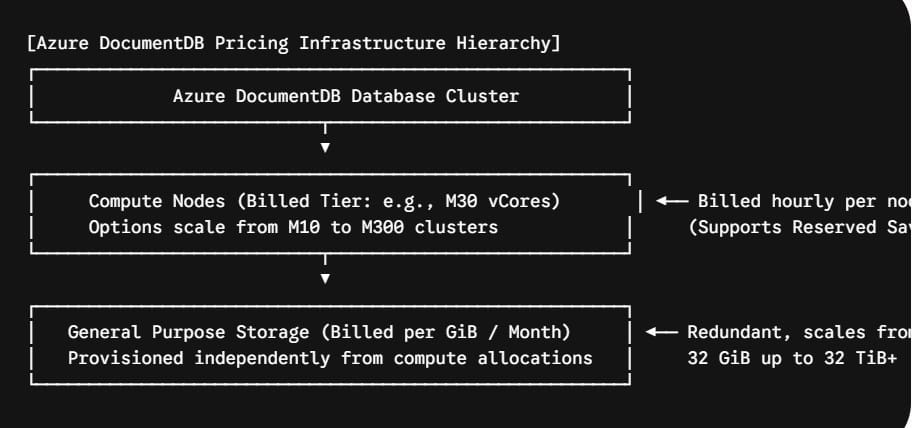
The service breaks down your monthly billing into two primary, isolated meters:
- The Node Compute Component: You provision a cluster composed of specific node tiers (e.g., M10, M30, M50). Each tier delivers a fixed, dedicated allocation of vCores and memory (GiB) per node. Your cost accumulates based on the number of nodes deployed multiplied by their hourly running rate.
- The General Purpose Storage Component: You choose and provision your required disk storage capacity completely independently of your compute nodes. Storage is billed at a flat, redundant monthly rate per GiB, scaling from a baseline of 32 GiB all the way up to massive 32 TiB database clusters.
Cluster Tier Matrix: vCores, Memory, and US Retail Costs
To size your database accurately, you must align your workload’s memory and processor demands with the correct cluster tier. Sizing up provides more hardware resources but increases your baseline costs.
Let’s look at the standard Azure DocumentDB cluster configurations alongside baseline United States retail pricing structures (rates reflect standard pay-as-you-go pricing in primary zones like East US):
| Cluster Tier Level | Dedicated vCores per Node | System Memory (GiB) per Node | Baseline Cost (Per Node / Month) | 3-Year Reserved Node Discount |
| M10 | 1 | 2 | ~$13.94 | N/A (Dev/Test Only) |
| M20 | 2 | 4 | ~$55.77 | N/A (Dev/Test Only) |
| M25 | 2 (Burstable) | 8 | ~$81.40 | N/A |
| M30 | 2 | 8 | ~$100.68 | ~60% Savings (~$40.00/mo) |
| M40 | 4 | 16 | ~$201.37 | ~60% Savings (~$80.01/mo) |
| M50 | 8 | 32 | ~$402.73 | ~60% Savings (~$160.02/mo) |
| M60 | 16 | 64 | ~$805.47 | ~60% Savings (~$320.03/mo) |
| M80 | 32 | 128 | ~$1,610.93 | ~60% Savings (~$640.06/mo) |
| M300 | 96 | 384 | ~$4,832.79 | ~60% Savings (~$1,920.19/mo) |
Analyzing Storage Costs
Storage rates are completely detached from your compute choices. You scale your disks based on your raw data footprint. For general-purpose, highly redundant storage nodes in the US East region, you can budget using these rounded increments:
- 32 GiB Baseline: ~$3.68 / month
- 128 GiB Allocation: ~$14.72 / month
- 1,024 GiB (1 TiB): ~$117.76 / month
- 4,095 GiB (4 TiB): ~$470.93 / month
Advanced Cost Optimization Strategies for Enterprise Infrastructure
Managing enterprise architectures effectively means optimizing your configurations to eliminate wasted spend. Implementing these architectural practices can significantly reduce your monthly Azure DocumentDB costs.
Strategy A: Maximize Reserved Node Capacity
If your core systems run predictable, steady data pipelines 24/7/365, paying the standard hourly pay-as-you-go retail rate introduces unnecessary overhead.
Microsoft offers deep Reserved Capacity benefits for production-level cluster tiers (starting at the M30 tier level and above). By committing to a 1-year or 3-year term for your baseline compute nodes, your organization can instantly slash your node infrastructure bill by up to 40% to 60% respectively.
Strategy B: Deferring High Availability (HA) for Non-Production Environments
In a production deployment, maintaining business continuity is critical. Azure DocumentDB provides an enterprise High Availability (HA) replica setting that automatically deploys standby replicas to guarantee your service level agreements (SLAs).
However, running duplicate nodes in staging, sandboxes, or local testing environments is an expensive anti-pattern.
- By explicitly disabling the High Availability toggle on your Dev/Test clusters, you immediately cut the compute requirement for that environment in half.
- This saves your organization 50% of the compute node cost across your entire development pipeline without risking production availability.
Strategy C: Using the Flexible Savings Plan for Database Workloads
If your organization manages an evolving, dynamic infrastructure where you frequently modernize, reshape schemas, or shift between different Azure data platforms, a rigid single-database reservation might not fit your workflow.
Instead, look into the Flexible Savings Plan for Database Workloads.
- You commit to a fixed, total hourly spend (measured in dollars per hour) across your eligible Azure database services for a 1-year term.
- The system automatically applies a 20% contract discount to your active Azure DocumentDB nodes every single hour, prioritizing the highest-value usage first. This reduces your overall costs while providing the flexibility to adapt your architecture as business needs change.
Secondary Costs: Data Protection, AI Features, and Network Egress
To build an accurate Total Cost of Ownership (TCO) model, you must account for secondary billing parameters that can sneak into your monthly invoice if unmonitored.
- Integrated Vector Search Capabilities: A massive architectural advantage of Azure DocumentDB is its native support for advanced AI applications. Unlike other platforms that force you to buy external vector search add-ons, DocumentDB includes vector indexing and high-dimensional queries at no extra cost. Even the free tier tier includes full vector database features, keeping your AI architecture simple and secure.
- Backup Storage Windows: Automated database backups are included to protect your data integrity. Azure provides complete backup storage retention for up to 35 days at no additional charge.
- Network Bandwidth and Egress: Ingestion of data into your Azure DocumentDB cluster from the internet is entirely free. However, any data that leaves the Azure cloud network to the public internet, or transfers across regional boundaries via the Azure WAN for geo-replication, incurs standard outbound data transfer fees per gigabyte.
Conclusion
By understanding the relationship between compute node configurations and storage options, you can eliminate cloud waste and protect your budget. This approach lets you build a highly reliable NoSQL layer capable of scaling alongside your most demanding enterprise and AI workloads. Keep your nodes rightsized, your dev environments single-instance, and your cloud database storage fully optimized!
You may also like the following articles:

I am Rajkishore, and I am a Microsoft Certified IT Consultant. I have over 14 years of experience in Microsoft Azure and AWS, with good experience in Azure Functions, Storage, Virtual Machines, Logic Apps, PowerShell Commands, CLI Commands, Machine Learning, AI, Azure Cognitive Services, DevOps, etc. Not only that, I do have good real-time experience in designing and developing cloud-native data integrations on Azure or AWS, etc. I hope you will learn from these practical Azure tutorials. Read more.