
In this article, I will break down the structural realities of Azure NetApp Files pricing, analyze its performance tiers, and map out cost-optimization strategies to keep your deployments highly efficient.
Azure NetApp Files Pricing
The Core Billing Engine: How ANF Charges for Storage
To manage your budget effectively, you must understand that Azure NetApp Files does not charge you based on the raw volume of data written by your virtual machines. Instead, it bills based on provisioned capacity within a structural element called a Capacity Pool.
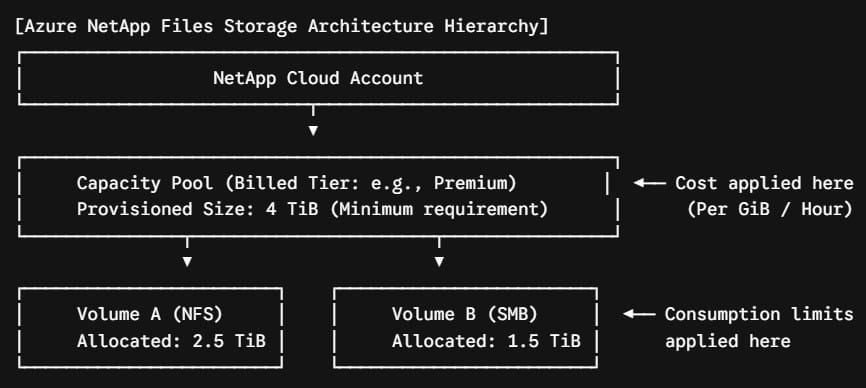
The Capacity Pool Logic
When you deploy ANF, you first create a Capacity Pool. This pool is assigned a specific performance tier (Service Level) and a defined storage allocation.
- The Minimum Threshold: You must provision a minimum capacity pool size of 1 TiB.
- The Billing Increment: You can dynamically scale the pool size up or down in precise 1 TiB increments.
- The Charging Model: Azure converts your provisioned monthly pool size into an hourly billing metric (per GiB-hour). Whether your volumes are 100% full or completely empty, you are billed for the total capacity provisioned in the parent pool.
Linear Performance Tiers: Throughput vs. Cost
Azure NetApp Files couples throughput closely with storage capacity. In the primary linear tiers, throughput scales automatically for every TiB you provision. If you need more speed, you provision more space.
| Service Performance Tier | Provisioned Throughput Allocation | Baseline US East Cost (Per GiB / Month) | Target Workload Profiles |
| Standard Storage | 16 MiB/s per provisioned TiB | ~$0.147 | General file shares, static web content, backup targets |
| Premium Storage | 64 MiB/s per provisioned TiB | ~$0.294 | Standard enterprise databases, virtualization datastores, ERP platforms |
| Ultra Storage | 128 MiB/s per provisioned TiB | ~$0.393 | High-performance computing (HPC), latency-critical SAP HANA nodes |
The Scale Constraint Scenario
Consider the dependency between size and performance: if you provision a 2 TiB Capacity Pool on the Premium tier, your available bandwidth across all sub-volumes is capped at exactly $2 \times 64 = 128\text{ MiB/s}$.
If your data processing application suddenly demands 256 MiB/s of operational bandwidth, you must scale the entire capacity pool up to 4 TiB to clear the performance ceiling, which doubles your monthly base storage spend.
The Flexible Service Level
To resolve the throughput-capacity dependency, Microsoft introduced the Flexible service level. This tier decouples storage capacity from performance limits, offering a significant architectural advantage.
Decoupled Quality of Service (QoS)
With the Flexible tier, you decouple your resource billing into two separate meters:
- Capacity Meter: You pay a lower baseline cost for the storage space you provision (typically around ~$0.110 per GiB/month).
- Throughput Meter: You choose and configure the exact amount of bandwidth you need (in MiB/s) as an independent setting. A baseline performance allocation is included, and any additional performance is billed as a flat add-on rate per provisioned MiB/s-hour.
The Optimization Strategy
If you have a database that requires a very small storage capacity (e.g., 1 TiB) but demands extreme throughput (e.g., 512 MiB/s), configuring it under a traditional linear tier would force you to provision a costly 4 TiB Ultra pool just to get the required bandwidth ($4 \times 128 = 512\text{ MiB/s}$).
By switching to the Flexible tier, you can provision just the 1 TiB of capacity you need and explicitly set the performance slider to 512 MiB/s. This approach reduces unnecessary overall storage overhead.
Advanced Cost Optimization Frameworks
Managing enterprise cloud configurations effectively requires utilizing cost optimization tools. Implementing these three architectural patterns can significantly lower your ANF spending.
Strategy A: Implementing Cool Access Auto-Tiering
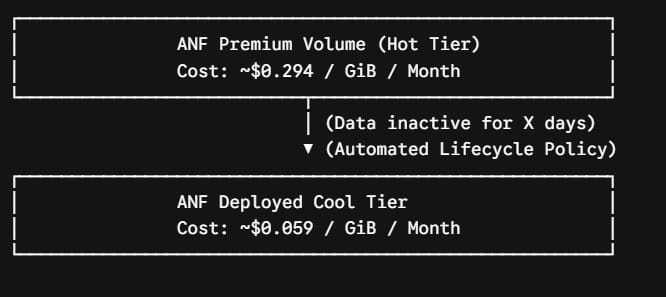
Not all data in a production volume remains hot. Typically, up to 70% of historical files, old snapshots, and logs are rarely accessed after 30 days. Leaving this cold data on premium SSD storage drives up your infrastructure spend.
By enabling Cool Access, the native ANF engine automatically identifies inactive blocks and moves them down to a secure Azure storage tier.
- The Financial Impact: While hot data inside a Premium pool costs ~$0.294 per GiB/month, data shifted to the cool tier drops to roughly $0.059 per GiB/month.
- The Operational Trade-off: You avoid paying premium storage rates for inactive data, though you do incur a minimal transaction fee (typically around $0.02 per GiB) if an application recalls a cold file back to the hot performance tier.
Strategy B: Dynamic Capacity Resizing via Automated Scripts
Because ANF allows you to resize capacity pools instantly with no downtime, you do not need to over-provision storage for peak loads.
If your system runs a heavy batch processing operation only on the final weekend of the month, you can use automated Azure Automation runbooks or CLI scripts to scale your capacity pool from 4 TiB up to 20 TiB right before the processing starts.
Once the data processing is finished, downscale the pool back to its baseline size. Because billing is calculated hourly, you only pay for the high-performance tier during the hours it was actively deployed.
Strategy C: Committed Use Savings (Reserved Capacity)
If your infrastructure teams are running large workloads with predictable baseline footprints, you should avoid standard pay-as-you-go pricing models.
Azure provides Reserved Capacity benefits for Azure NetApp Files when you commit to a 1-year or 3-year agreement. Purchasing reservations in fixed increments (such as 100 TiB or 1 PiB blocks) can save your organization up to 15% to 35% compared to standard retail rates. This provides predictable, fixed storage costs for your long-term enterprise systems.
Secondary Cost Considerations: Data Protection and Encryption
To build an accurate Total Cost of Ownership (TCO) model, you must account for the secondary billing parameters associated with data resilience and compliance operations.
- Snapshots and Clones: ANF uses space-efficient pointers for snapshots. The snapshot itself occupies zero additional space initially. However, as block-level changes occur in the active live filesystem, the differential modifications are saved and billed at the same rate as the host capacity pool.
- Cross-Region Replication (CRR): If you configure automated replication to a secondary region for Disaster Recovery (DR), you pay for the secondary storage pool in the target region. Additionally, you are billed an execution fee per GiB for the data transferred between those regions, based on how frequently you replicate (Daily, Hourly, or every 10 minutes).
- Double Encryption at Rest: If your security framework requires double encryption (combining hardware-level encryption with software-based customer-managed keys), you will see an increased baseline per-GiB rate applied to the capacity pool to cover the extra processing and key vault tracking overhead.
Architecture Validation: The ANF Cost Optimization
Before approving any production deployment requests for Azure NetApp Files, run through this comprehensive checklist to ensure your storage strategy is lean and cost-effective:
- Tier Alignment: Verified that your chosen service level (Standard, Premium, Ultra, or Flexible) matches your workload’s actual IOPS and throughput requirements without over-provisioning storage space.
- Flexible Tier Evaluation: Evaluated if using the Flexible tier can optimize workloads that require high performance but minimal storage volume.
- Cool Access Policy: Enabled Cool Access tiering rules for file storage pools with highly cyclical or historical access patterns.
- Capacity Boundary Controls: Configured automated monitoring alerts to ensure capacity pool allocations match active requirements without excess unallocated buffer space.
- Automation Readiness: Built scaling scripts to dynamically expand capacity pools during known peak intervals and downscale them afterward.
- Reservation Commitments: Reviewed base capacity baselines with procurement teams to secure 1-year or 3-year Reserved Capacity discounts for stable workloads.
- Snapshot Retention Limits: Established strict lifecycle schedules to automatically purge old block-level snapshots before they drive up storage consumption fees.
You may also like the following articles:

I am Rajkishore, and I am a Microsoft Certified IT Consultant. I have over 14 years of experience in Microsoft Azure and AWS, with good experience in Azure Functions, Storage, Virtual Machines, Logic Apps, PowerShell Commands, CLI Commands, Machine Learning, AI, Azure Cognitive Services, DevOps, etc. Not only that, I do have good real-time experience in designing and developing cloud-native data integrations on Azure or AWS, etc. I hope you will learn from these practical Azure tutorials. Read more.