
In this article, I will break down exactly what MFA is, how it works under the hood, the core authentication factors, the key differences between 2FA and MFA, and how you can implement a resilient MFA strategy across your organization.
What Is An MFA
What Is Multi-Factor Authentication (MFA)?
Multi-Factor Authentication (MFA) is an electronic identity verification method that requires a user to provide two or more distinct verification factors before gaining access to an application, digital account, VPN, or network resource.
Instead of asking only for a single piece of evidence (like a username and password), MFA mandates multiple independent credentials across different authentication categories.
Core Principle: If one credential is compromised or stolen, an unauthorized intruder still cannot bypass the remaining defensive layers required to gain access.
In cybersecurity architecture, MFA forms a foundational pillar of Zero Trust Architecture (ZTA)—a security model based on the principle of “never trust, always verify.”
Why Passwords Alone Are No Longer Enough
To understand the necessity of MFA, we must examine why single-factor authentication (SFA) fails so consistently:
- Credential Reuse: Users frequently reuse passwords across personal and corporate platforms. When an arbitrary third-party site suffers a breach, those same credentials are automatically tested against enterprise systems.
- Sophisticated Phishing: Modern phishing campaigns replicate legitimate corporate login pages with near-perfect fidelity, tricking even vigilant employees into surrendering their passwords.
- Brute-Force & Dictionary Attacks: Automated computing tools can guess millions of standard password permutations in seconds.
- Keyloggers and Malware: Malware residing on endpoints can intercept keystrokes quietly, capturing passwords the moment they are typed.
Implementing MFA neutralizes the vast majority of these attacks. Even if an adversary possesses a valid password, they cannot complete the login sequence without the secondary factor.
The Core Pillars: The Factors of Authentication
For an authentication sequence to be classified as multi-factor, the credentials requested must originate from at least two different categories from the following authentication pillars:
1. Knowledge Factor (Something You Know)
This is the most traditional form of authentication. It represents private data that the authorized user has memorized and must reproduce accurately.
- Traditional static passwords
- Personal Identification Numbers (PINs)
- Pre-configured security questions (e.g., mother’s maiden name)
Possession Factor (Something You Have)
This factor requires the user to prove physical or cryptographic ownership of a registered device or token.
- Smartphone authenticator apps generating Time-Based One-Time Passwords (TOTP)
- Hardware security keys (e.g., FIDO2/WebAuthn USB or NFC keys)
- Smart cards or chip-enabled enterprise badges
- Software certificates stored on a registered machine
Inherence Factor (Something You Are)
Inherence uses unique biological and physical traits to verify identity. These are exceptionally difficult for an attacker to spoof remotely.
- Fingerprint scans
- Facial recognition mappings
- Retina or iris scans
- Voice recognition patterns
Contextual & Behavioral Factors (Somewhere You Are / Something You Do)
Modern adaptive authentication frameworks often incorporate ambient signals to dynamically assess risk:
- Location (Geolocation / Geofencing): Verifying whether the login IP originates from an approved US region or a known corporate office.
- Behavioral Biometrics: Analyzing typing cadences, mouse dynamics, and interaction rhythms.
- Device Posture: Checking if the operating system is patched, encrypted, and managed by corporate policy.
Common MFA Methods and Technologies
Let’s break down the primary mechanisms used to deliver secondary authentication factors today, ranked from traditional to modern standards.
1. SMS and Voice-Based Verification Codes
The user receives an out-of-band numeric code via text message or telephone voice call.
- Strengths: Universally accessible; requires no special app installation.
- Weaknesses: Highly vulnerable to SIM-swapping, SS7 telecom interception, and adversary-in-the-middle (AiTM) phishing.
2. Time-Based One-Time Passwords (TOTP via Authenticator Apps)
Applications generate a rotating 6-digit cryptographic code synchronized with an authentication server every 30 or 60 seconds using algorithms like RFC 6238.
- Strengths: Functions offline without cellular service; immune to SIM swapping.
- Weaknesses: Can still be intercepted by sophisticated real-time reverse-proxy phishing kits.
3. Push Notifications with Number Matching
An authentication platform sends an encrypted push prompt to the user’s mobile device. To prevent accidental approvals, modern implementations require number matching—the user must type a two-digit number displayed on their login screen into the mobile app prompt.
- Strengths: Fast, user-friendly, and eliminates blind approvals caused by “MFA fatigue” spamming.
- Weaknesses: Requires a data connection and active mobile management.
4. FIDO2 / WebAuthn Hardware Security Keys
Physical USB, Lightning, or NFC tokens that use public-key cryptography to authenticate the user directly against the domain.
- Strengths: Phishing-resistant. The cryptographic handshake is bound to the exact browser domain origin, rendering credential theft impossible.
- Weaknesses: Requires hardware provisioning and physical inventory management.
How MFA Works: Step-by-Step Technical Flow
To visualize the mechanics of multi-factor authentication, consider this standard flow during an enterprise session:
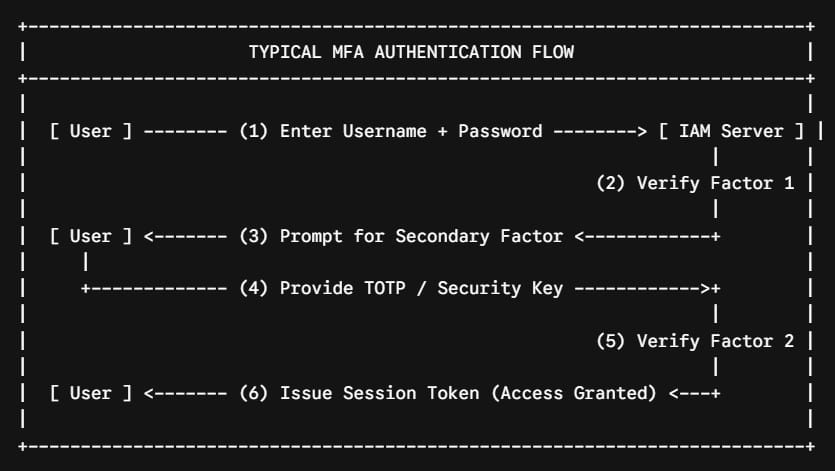
- Primary Request: The user initiates access by submitting their primary identifier and secret (Factor 1: Knowledge).
- First Validation: The Identity and Access Management (IAM) server validates the primary credentials against its directory.
- Challenge Generation: Once the first factor passes, the IAM server pauses the authentication lifecycle and generates a secondary challenge.
- Factor Response: The user responds using their registered authenticator device (Factor 2: Possession or Inherence).
- Cryptographic Validation: The IAM server verifies the cryptographic response or one-time code against the user’s registered profile.
- Session Assertion: Upon mutual validation, the server issues an encrypted session token (e.g., SAML assertion, JSON Web Token/JWT), granting access to the target environment.
Frequently Asked Questions (FAQs)
Does MFA make a system 100% unhackable?
No security control provides absolute immunity. However, enforcing MFA eliminates the vast majority of automated, opportunistic attacks. When paired with phishing-resistant protocols (like FIDO2/WebAuthn), MFA creates an exceptionally strong defensive perimeter.
What happens if an employee loses their MFA device?
Organizations must maintain secure break-glass procedures and pre-generated recovery backup codes. When an employee loses their device, an identity-verified help desk administrator can revoke the old token and provision a new device enrollment session.
Is MFA mandatory for regulatory compliance?
Yes. Modern cybersecurity compliance frameworks—including PCI-DSS (v4.0), HIPAA, SOC 2, NIST SP 800-63B, and CMMC—explicitly mandate multi-factor authentication for accessing sensitive records, cloud infrastructures, and administrative interfaces.
Final Thoughts
Implementing Multi-Factor Authentication is no longer an optional security; it is the fundamental baseline of modern digital resilience.
Whether you are securing an enterprise environment or protecting your personal accounts, take the time today to enable strong, app-based or hardware-backed MFA across every system you manage.
You may also like the following articles:
- How to Grant Admin Rights to User in Azure Portal
- Microsoft Entra ID Sign-In Logs Where to Find
- Microsoft Entra ID Tutorial For Beginners
- What are the main benefits of using Microsoft Entra ID

I am Rajkishore, and I am a Microsoft Certified IT Consultant. I have over 14 years of experience in Microsoft Azure and AWS, with good experience in Azure Functions, Storage, Virtual Machines, Logic Apps, PowerShell Commands, CLI Commands, Machine Learning, AI, Azure Cognitive Services, DevOps, etc. Not only that, I do have good real-time experience in designing and developing cloud-native data integrations on Azure or AWS, etc. I hope you will learn from these practical Azure tutorials. Read more.