
In this comprehensive tutorial, we will break down the az webapp create command from the ground up. We will look at prerequisites, examine essential parameters, map out runtime stacks, and explore the advanced flags that allow you to configure production-ready hosting environments entirely from the command line.
az webapp create
Prerequisites:
To follow along with this tutorial, you will need a functioning Azure environment. Let’s establish a clean, organized baseline setup.
1. Authenticate and Select Your Subscription
First, verify that your CLI session is authenticated and pointing to the correct billing container.
Bash
# Log into your Azure account
az login

# List subscriptions to find the correct ID
az account list --output table

# Set the active subscription context
az account set --subscription "Your-Subscription-Name-or-ID"
After executing the query above, I obtained the expected output shown in the screenshot below.


2. Establish the Resource Group and App Service Plan
An Azure Web App cannot exist in a vacuum. It requires two parent resources:
- A Resource Group: A logical container for your Azure assets.
- An App Service Plan: The underlying virtual machine wheelhouse that provides the CPU, memory, and OS characteristics for your application.
Let’s provision these infrastructure dependencies now:
Bash
# Define variable parameters for easy modification
RESOURCE_GROUP="rg-dev-webapps-eastus"
LOCATION="eastus"
PLAN_NAME="asp-dev-linux-flexible"

# Create the logical resource container
az group create --name $RESOURCE_GROUP --location $LOCATION

# Create a Linux-based App Service Plan on the Basic tier
az appservice plan create \
    --name $PLAN_NAME \
    --resource-group $RESOURCE_GROUP \
    --location $LOCATION \
    --sku B1 \
    --is-linux
Check out the screenshot below for your reference.
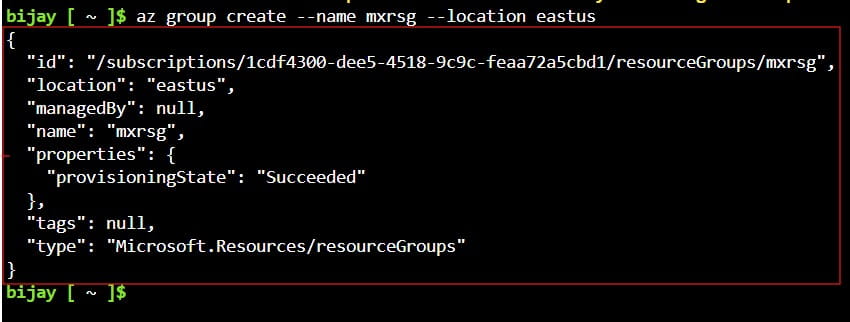
With the resource group and host plan established, the foundation is ready for the core deployment command.
Understanding the Core Syntax of az webapp create
The structural anatomy of the az webapp create command relies on three mandatory arguments, alongside a variety of optional parameter flags that determine the OS runtime platform and code delivery mechanics.
The foundational blueprint of the command looks like this:
Bash
az webapp create \
    --name <unique-app-name> \
    --resource-group <group-name> \
    --plan <app-service-plan-name>
However, running this bare-minimum command without specifying a runtime stack or deployment mechanism will cause Azure to fall back to default assumptions (often an older Windows .NET stack), which might not align with your application needs.
Let’s examine the primary functional inputs used to customize this behavior:
| Parameter Flag | Requirement | Functional Purpose |
| –name / -n | Mandatory | The globally unique name of your web app. This string forms your default public endpoint URL: https://.azurewebsites.net. |
| –resource-group / -g | Mandatory | The existing Azure Resource Group where the web app’s metadata and tracking endpoints will live. |
| –plan / -p | Mandatory | The target App Service Plan that dictates the computing capacity and OS architecture. |
| –runtime / -r | Optional | Specifies the built-in language stack and version framework (e.g., DOTNET|8.0, NODE|20-lts, PYTHON|3.11). |
| –docker-custom-image-name / -i | Optional | Points to a pre-built container image in Docker Hub or Azure Container Registry for containerized deployments. |
Runtime Selection: Code vs. Container Deployments
When preparing to execute az webapp create, you must choose between two distinct application architecture strategies: Code-based (Native Runtime) or Container-based (Custom Image).
Scenario A: Deploying a Code-Based Application (Native Runtimes)
If you are deploying a standard code project (such as a compiled .NET binary, a Node.js API, or a Python Django application), you must tell Azure which language runtime engine to run on the underlying host worker.
To find the exact string identifier required by the –runtime flag, use the list command filtered by your target operating system:
Bash
# List available runtimes for Linux-based App Service Plans
az webapp list-runtimes --os linux --output table
For instance, if an enterprise developer like Sarah Jenkins in Chicago is launching a modern web API using .NET 8 on Linux, she would format the creation statement like this:
Bash
az webapp create \
    --name "app-chicagotech-prod-api" \
    --resource-group "rg-dev-webapps-eastus" \
    --plan "asp-dev-linux-flexible" \
    --runtime "DOTNET|8.0"
Scenario B: Deploying a Containerized Application (Custom Images)
Here is how you initialize a web application mapped to a public Docker Hub repository image:
Bash
az webapp create \
    --name "app-seattle-container-service" \
    --resource-group "rg-dev-webapps-eastus" \
    --plan "asp-dev-linux-flexible" \
    --docker-custom-image-name "docker.io/library/nginx:latest"
Advanced Management Operations via CLI Flags
A basic web app is fine for testing, but production environments require stricter security governance, network isolation, and telemetry pipelines. The az webapp create ecosystem includes parameters designed to bake these operational requirements directly into the initial provisioning step.
1. Enforcing HTTPS and Restricting Insecure Protocols
Modern web applications should never serve traffic over unencrypted HTTP channels. Instead of deploying an open app and securing it later, you can enforce traffic encryption directly at creation:
Bash
az webapp create \
    --name "app-secure-fintech-boston" \
    --resource-group "rg-dev-webapps-eastus" \
    --plan "asp-dev-linux-flexible" \
    --runtime "NODE|20-lts" \
    --min-tls-version "1.2"
2. Assigning Managed Identities for Passwordless Architecture
Securing database connection strings and API keys is a major challenge in cloud management. By enabling a system-assigned managed identity during the resource creation phase, you grant the web app its own identity within Microsoft Entra ID (formerly Azure Active Directory). This allows your application code to securely authenticate against key vaults, databases, and storage accounts without hardcoded passwords.
Bash
az webapp create \
    --name "app-identity-secured-denver" \
    --resource-group "rg-dev-webapps-eastus" \
    --plan "asp-dev-linux-flexible" \
    --runtime "PYTHON|3.11" \
    --assign-identity
By moving your infrastructure workflows into the Azure CLI, you can build clean, repeatable cloud environments that deploy consistently every time. Master these commands, build your automation scripts carefully, and enjoy your faster deployment pipelines!
You may also like the following articles:

I am Rajkishore, and I am a Microsoft Certified IT Consultant. I have over 14 years of experience in Microsoft Azure and AWS, with good experience in Azure Functions, Storage, Virtual Machines, Logic Apps, PowerShell Commands, CLI Commands, Machine Learning, AI, Azure Cognitive Services, DevOps, etc. Not only that, I do have good real-time experience in designing and developing cloud-native data integrations on Azure or AWS, etc. I hope you will learn from these practical Azure tutorials. Read more.
