
In this article, I will take you inside both structural layers, Azure Resource Group vs Management Group. We will analyze their contrasting architectural philosophies, map out feature capabilities side-by-side, explore inheritance paths, and establish a best-practice selection matrix for your organization.
Azure Resource Group vs Management Group
The Azure Resource Hierarchy: Mapping the Layers
To understand the practical difference between Management Groups and Resource Groups, you must visualize the four distinct management scopes provided by Azure. Governance settings, policy frameworks, access permissions (RBAC), and operational restrictions flow natively from the highest logical scope down to the individual child assets.
As illustrated above, the logical cascading flow of the Azure control plane operates top-down:
- Level 1: The Tenant Root Management Group: The ultimate administrative umbrella bound directly to your Microsoft Entra ID tenant directory.
- Level 2: Management Groups: Organizational containers used to group, govern, and audit multiple subscriptions collectively.
- Level 3: Subscriptions: Logical billing boundaries and identity trust frames that hold resource quotas.
- Level 4: Resource Groups: Granular, lifecycle-aligned containers that directly house your deployed cloud assets.
Architectural Philosophies: Enterprise Governance vs. Asset Lifecycles
Azure Management Groups: The Governance Umbrella
Management Groups are engineered strictly for high-level, macro governance. They do not hold physical resources like virtual machines, storage accounts, or virtual networks. Instead, their sole purpose is to act as logical aggregation boundaries for Subscriptions.
If your organization operates dozens or hundreds of subscriptions across separate business departments, compliance zones, or geographic landscapes, Management Groups provide the mechanism to bring order to that scale.
For example, you can group all subscriptions associated with research and development into a single target container and enforce relaxed compliance rules, while packing your production subscriptions under an isolated parent group equipped with strict data residency controls.
Azure Resource Groups: The Lifecycle Container
Resource Groups function at the micro-operational level. They are the physical, mandatory containers that hold your live infrastructure assets. Every single resource deployed into Azure must reside inside exactly one parent Resource Group.
The core architectural principle behind a Resource Group is shared lifecycle alignment. You should group resources together because they are deployed together, updated together, monitored together, and deleted together.
For example, the virtual machines, network interfaces, and database instances that make up a distinct corporate web application belong in the same Resource Group. If a server operates on a different deployment or decommissioning cycle, it belongs in a separate container.
Technical Feature Comparison Matrix
| Operational Dimension | Azure Management Groups | Azure Resource Groups |
| Hierarchy Placement | Sitting above Subscriptions (Levels 1 & 2). | Sitting below Subscriptions (Level 4). |
| Primary Structural Content | Holds other Management Groups or Subscriptions. | Holds live Azure resources (VMs, Storage, VNets). |
| Core Intended Purpose | Enterprise policy enforcement, global RBAC, billing rollups. | Lifecycle management, asset deployment, local access boundaries. |
| Maximum Scale Limits | Up to 10,000 groups per tenant; up to 6 levels of depth. | Up to 980 resource groups per single Subscription. |
| Physical Data Location | Global service metadata; independent of Azure regions. | Tied to an explicit Azure region for local metadata storage. |
| Asset Lifecycle Actions | Modifying a group has no impact on underlying compute runtimes. | Deleting a group triggers a cascade deletion of all child resources. |
| Tagging Inheritance | Used to group metadata; does not flow down to resources natively. | Tags applied here are stored locally but don’t auto-inject into child assets. |
Deep Dive: Security, RBAC, and Policy Inheritance
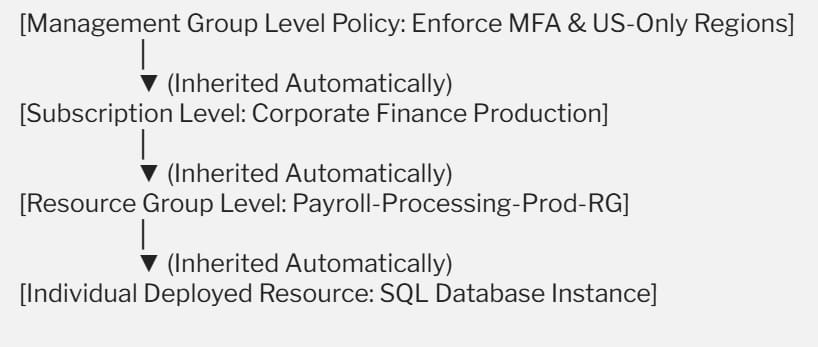
The single most powerful architectural mechanism within the ARM fabric is Inheritance. When you configure an explicit parameter at a higher scope, that setting flows down automatically to every downstream asset unless a strict deny action blocks it.
Applying Azure Policy at Scale
Azure Policy allows you to establish guardrails across your cloud estate. Understanding where to scope these rules is key to maintaining agility.
- Management Group Policy Scope: Ideal for global, non-negotiable security mandates. For instance, if your company must comply with strict US data residency laws, you can assign an allowed-locations policy at the parent Management Group level. Every subscription added to that group now or in the future will automatically block developers from launching virtual nodes outside your approved domestic regions.
- Resource Group Policy Scope: Best utilized for local, application-specific rules. For example, you can enforce a mandatory naming convention or require specific resource tagging metadata (such as
CostCenterorOwner) specifically within a project’s local resource container.
Designing a Clean Role-Based Access Control (RBAC) Strategy
Enforcing the principle of least privilege requires mapping your administrative assignments to the correct logical tier:
- Grant your global information security and monitoring teams Reader or Security Admin roles at the Management Group scope. This ensures they have full, visibility across all subscriptions without requiring manual role assignments every time a new project launches.
- Grant your application developers Contributor or Owner roles strictly at the Resource Group scope. This gives them complete freedom to create, modify, and delete resources within their sandboxed workspace while ensuring they cannot modify underlying cross-site networks, peer-to-peer VPN circuits, or centralized platform services.
Structural Anti-Patterns to Avoid
- Treating the Root Management Group as a Dumping Ground: Never assign custom policies or heavy RBAC roles directly to your Tenant Root Group. Because everything in your tenant inherits from the root, applying a restrictive policy here can inadvertently break automated platform operations, billing hooks, or emergency access accounts. Always create an intermediate management group directly below the root to act as your top-level corporate boundary.
- Grouping by Resource Type Instead of Lifecycle: Organizing your environment by building a “Storage-RG” for all storage accounts and a “VM-RG” for all virtual machines is a significant mistake. This breaks lifecycle mapping. If you need to upgrade or decommission a specific corporate application, your team will have to manually pick through multiple disjointed groups, increasing the risk of orphaned resources and security blind spots.
- Confusing the Location of the Resource Group: When creating a Resource Group, Azure requires you to pick a target region (e.g., East US). This setting only dictates where the group’s administrative metadata is physically stored. The individual resources inside that container can reside in completely different global regions depending on your application needs.
Summary
Building a reliable, well-governed cloud footprint requires clear boundaries.
- Leverage Azure Management Groups as your high-level governance framework to organize multiple subscriptions, enforce global compliance rules, and manage wide-reaching security roles across your entire organization.
- Utilize Azure Resource Groups as your micro-level operational containers to group related assets that share an identical lifecycle, simplifying deployments, access boundaries, and decommissioning cycles.
You may also like the following articles:
- Azure Resource Group vs Resource Manager
- Rename Resource Group Azure
- How to delete Resource Group in Azure
- How to recover deleted Resource Group Azure

I am Rajkishore, and I am a Microsoft Certified IT Consultant. I have over 14 years of experience in Microsoft Azure and AWS, with good experience in Azure Functions, Storage, Virtual Machines, Logic Apps, PowerShell Commands, CLI Commands, Machine Learning, AI, Azure Cognitive Services, DevOps, etc. Not only that, I do have good real-time experience in designing and developing cloud-native data integrations on Azure or AWS, etc. I hope you will learn from these practical Azure tutorials. Read more.
