
Azure Cosmos DB is rarely expensive by design; rather, it becomes expensive through misconfiguration. When you understand how Microsoft meters and charges for compute, storage, and networking, you can accurately forecast your cloud spend and eliminate runaway costs.
Azure Cosmos DB Pricing
Understanding the Core Currency: What Is a Request Unit (RU)?
To master Azure Cosmos DB pricing, you must first understand the fundamental unit of database throughput: the Request Unit (RU).
In traditional relational systems hosted on Azure Virtual Machines or AWS EC2, you provision fixed hardware metrics—vCPUs, RAM, and IOPS. Azure Cosmos DB abstracts this physical infrastructure into a deterministic performance currency measured as Request Units per second (RU/s).
A single Request Unit (1 RU) equals the compute, memory, and IOPS required to perform a single point read of a 1 KB JSON document using its unique item ID and partition key.
Key Factors That Inflate RU Consumption
- Document Payload Size: Writing a 10 KB item consumes significantly more RUs than writing a 1 KB item.
- Indexing Overhead: By default, Cosmos DB indexes every string, number, and nested object. While this provides rapid ad-hoc querying, it increases write operation costs.
- Consistency Level Selection: Relaxed consistency levels (Session, Eventual, Consistent Prefix) require standard RU costs. Selecting Strong or Bounded Staleness consistency requires reading across multiple replica copies, doubling read costs.
- Query Topology: Single-partition queries that leverage indexed properties execute efficiently at 2 to 5 RUs. Conversely, unbounded cross-partition queries scanning thousands of documents can quickly consume tens of thousands of RUs per request.
The Three Core Throughput Models Explained
Microsoft provides three distinct billing models for Azure Cosmos DB throughput. Choosing the wrong model for your traffic profile is the most common reason organizations overpay.
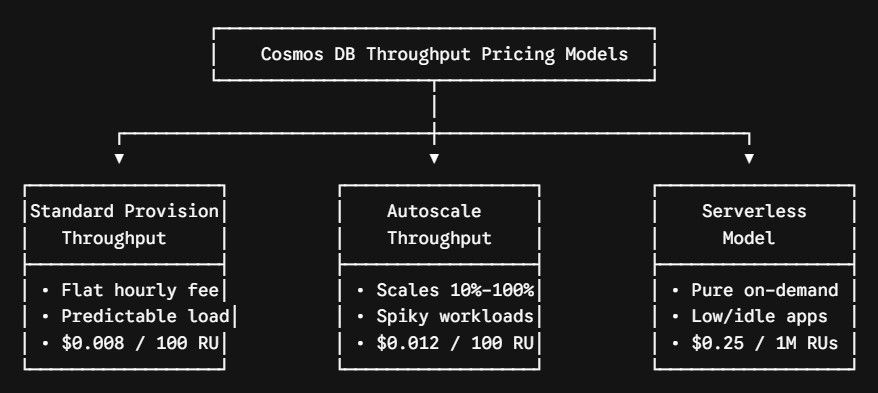
1. Standard (Manual) Provisioned Throughput
In this model, you explicitly allocate a fixed amount of throughput (e.g., 5,000 RU/s) to a container or database. You are billed a fixed rate of $0.008 per 100 RU/s per hour (in standard US regions), 24 hours a day, 7 days a week, regardless of whether your application consumes that capacity.
- Minimum Commitment: 400 RU/s per container or shared database (approximately $23.36/month for single-region deployment).
- Best Fit: Mission-critical enterprise applications with steady, highly predictable, 24/7 background traffic.
2. Autoscale Provisioned Throughput
Autoscale eliminates the administrative burden of manual capacity management by automatically scaling throughput dynamically between 10% and 100% of a defined maximum ceiling ($T_{max}$) based on incoming application demand.
- Pricing Formula: Autoscale is billed at $0.012 per 100 RU/s per hour—a 50% premium over standard manual provisioning. However, you only pay for the highest RU/s used in that specific hour, scaled down to 10% when idle.
- Scaling Mechanics: If you configure a $T_{max}$ of 10,000 RU/s, your system automatically adjusts between 1,000 RU/s and 10,000 RU/s. If your traffic drops to zero overnight, you are metered at only 1,000 RU/s ($0.12/hour) rather than paying for the full 10,000 RU/s ($1.20/hour).
- Best Fit: Workloads with unpredictable bursts, seasonal spikes, or high daytime activity paired with quiet overnight hours.
3. Serverless Mode
Serverless is a pure consumption-based model where you do not provision capacity in advance. You are billed strictly for the cumulative Request Units executed: $0.25 per 1,000,000 RUs consumed.
- Operational Bounds: Serverless containers operate in a single Azure region and scale up to 5,000 RU/s per partition, with storage capped at 1 TB per container.
- Best Fit: Development/testing environments, internal microservices, scheduled batch jobs, and new application prototypes that experience prolonged idle periods.
Throughput Architecture Comparison
| Dimension | Standard Provisioned | Autoscale Provisioned | Serverless |
| Pricing Baseline | $0.008 / 100 RU/s / hr | $0.012 / 100 RU/s / hr | $0.25 / 1 Million RUs |
| Minimum Floor | 400 RU/s ($23.36/mo) | 100 RU/s (10% of 1,000 max) | $0.00 (Zero minimum cost) |
| Multi-Region Writes | Fully Supported | Fully Supported | Single Region Only |
| SLA Guarantee | 99.99% to 99.999% | 99.99% to 99.999% | Service Availability Only |
| Cost Predictability | High (Fixed recurring cost) | Medium (Bounds-based) | Low (Purely request-driven) |
| Traffic Suitability | Steady, continuous 24/7 load | Spiky, cyclical workloads | Sporadic, idle, dev/test |
vCore-Based vs. Request Unit-Based Pricing
If you run MongoDB or PostgreSQL workloads, Microsoft offers vCore-based architecture in addition to native RU-based NoSQL engines.
- RU-Based (NoSQL, Table, Apache Cassandra, Gremlin): You pay for abstract capacity and dynamic throughput allocations. Ideal for born-in-the-cloud applications requiring automated elasticity and multi-master global distribution.
- vCore-Based (Cosmos DB for MongoDB / PostgreSQL): You choose dedicated compute tiers (e.g., 2 vCPUs, 8 GB RAM up to 128 vCPUs) with attached high-performance managed disks. Pricing mirrors standard infrastructure-as-a-service models, simplifying lift-and-shift migrations from on-premises clusters.
Storage, Backup, and Data Egress Cost Components
Compute throughput accounts for most of an Azure Cosmos DB bill, but storage, data protection, and network topologies can generate unexpected costs if unmonitored.
1. Storage Tiers
- Transactional Storage: SSD-backed, row-oriented primary operational storage charged at $0.25 per GB per month per region. If you replicate 200 GB across three US regions (East US, Central US, West US), you are billed for 600 GB ($150.00/month).
- Analytical Storage (Azure Synapse Link): Fully isolated, column-oriented analytical store charged at $0.03 per GB per month, plus minimal read/write operation fees ($0.05 per 10,000 write operations). This allows you to run intensive business intelligence and reporting queries without consuming expensive transactional RUs.
2. Backup and Disaster Recovery
- Periodic Backups: Microsoft retains two backup snapshots automatically at no additional charge. Extra snapshots are billed at $0.12 per GB per month.
- Continuous Backup (Point-in-Time Restore):
- 7-day retention is included at no additional charge.
- 30-day continuous retention is billed at $0.20 per GB per month per region.
3. Multi-Region Multipliers and Data Egress
Configuring multi-region replication multiplies your throughput and storage costs linearly:
$$\text{Total Monthly Compute} = \text{Base RU/s Provisioned} \times \text{Number of Read Regions} \times \text{Hourly Rate} \times 730\text{ hours}$$
Additionally, data transfers entering Azure data centers are free, but inter-region data transfer across geographies (such as replicating writes from East US to West US) incurs standard Azure egress bandwidth rates (typically $0.02 to $0.05 per GB).
Sizing and Estimation Blueprint: Sample Monthly Cost Models
To provide a concrete pricing baseline for production workloads in US cloud regions, review the following enterprise architectural profiles:
| Architectural Tier | Configured Capacity | Monthly Storage | Global Replication | Estimated Monthly Cost |
| Startup / Microservice | Serverless (10M RUs/month) | 15 GB | Single Region (East US) | ~$6.25 / month |
| Mid-Tier Web Portal | Autoscale (Max 4,000 RU/s; avg 1,200) | 100 GB | Single Region (Central US) | ~$130.00 / month |
| Enterprise E-Commerce | Standard (20,000 RU/s fixed) | 500 GB | Multi-Region (East US + West US) | ~$2,590.00 / month |
| Global Financial Platform | Autoscale (Max 50,000 RU/s per region) | 2,000 GB | 3 Regions (East US, West US 2, North Europe) | ~$7,800.00 / month |
7 Proven Architectural Strategies to Reduce Cosmos DB Costs
In my enterprise optimization reviews, applying disciplined data modeling and governance policies often reduces Cosmos DB monthly bills by 40% to 70%. Here is the architectural playbook I recommend:
1. Maximize the Lifetime Free Tier
Microsoft provides one Free Tier account per Azure subscription. This tier includes 1,000 RU/s of provisioned throughput (or 4,000 RU/s autoscale max) along with 25 GB of transactional storage at zero cost. Ensure development, sandbox, and integration test environments explicitly activate this setting.
2. Prune Default Indexing Policies
By default, Cosmos DB automatically indexes every property within every document. If your JSON payloads contain extensive metadata or telemetry attributes that are never queried directly in SQL WHERE clauses, exclude those JSON paths from your container indexing policy. Trimming these paths reduces your write RU consumption by up to 50%.
3. Evaluate Data Consistency Settings
Defaulting to Strong or Bounded Staleness consistency requires Cosmos DB to perform two-region read validations, doubling read RU consumption. For over 90% of business applications, Session Consistency provides sufficient read-your-own-writes consistency at half the compute cost.
4. Choose High-Cardinality Partition Keys
Selecting a low-cardinality partition key (such as State or Gender) causes all transactions to route through a small number of physical partitions, creating hot partitions.
Because Cosmos DB requires all physical partitions to share throughput equally, hitting RU rate limits (HTTP 429 Too Many Requests) on a single hot partition forces you to increase total container RU/s globally. Selecting high-cardinality keys (such as TenantId_UserId) distributes reads and writes evenly across all physical partitions.
5. Deploy the Azure Cosmos DB Integrated Cache
For read-heavy workloads where the same data is retrieved repeatedly, avoid routing every point read to disk.
By provisioning a Dedicated Gateway with an in-memory Integrated Cache, subsequent queries and point reads are served directly from RAM at 0 RUs, significantly lowering your long-term provisioned throughput requirements.
6. Implement Time-to-Live (TTL) for Storage Hygiene
Transactional storage costs ($0.25/GB/month) accumulate quickly if historical records, event streams, or session tokens are retained indefinitely. Configure container-level Time-to-Live (TTL) properties.
Cosmos DB purges expired documents automatically as a background process without consuming any of your provisioned RU/s, keeping storage usage lean.
7. Commit to Reserved Capacity for Predictable Production
If your production system requires steady, baseline throughput for at least a year, do not pay standard pay-as-you-go rates.
Microsoft offers Azure Cosmos DB Reserved Capacity, which reduces provisioned throughput costs by committing to one-year or three-year plans:
- 1-Year Commitment: Saves approximately 20% to 26% compared to pay-as-you-go rates.
- 3-Year Commitment: Saves approximately 35% to 65%, significantly improving cloud return on investment.
Azure Cosmos DB remains one of the most reliable and performant distributed databases in cloud computing. By aligning your workload’s traffic patterns with the appropriate throughput model (Serverless for sporadic tasks, Autoscale for spiky systems, Standard for steady-state engines), fine-tuning indexing policies, and applying storage hygiene, you can build low-latency applications that scale efficiently without exceeding your infrastructure budget.
You may also like the following articles:
- Azure Cosmos DB vs Azure SQL Database
- How to create Cosmos DB in Azure
- What is Cosmos DB good for
- Azure Cosmos DB Tutorial
- Cosmos DB vs MongoDB

I am Rajkishore, and I am a Microsoft Certified IT Consultant. I have over 14 years of experience in Microsoft Azure and AWS, with good experience in Azure Functions, Storage, Virtual Machines, Logic Apps, PowerShell Commands, CLI Commands, Machine Learning, AI, Azure Cognitive Services, DevOps, etc. Not only that, I do have good real-time experience in designing and developing cloud-native data integrations on Azure or AWS, etc. I hope you will learn from these practical Azure tutorials. Read more.