
The single most common question I encounter is: “How do I actually learn Microsoft Azure when I am starting completely from scratch?” Learning Azure isn’t about memorizing every button in the interface; it is about understanding core cloud mechanics and mapping them to real-world business infrastructure. In this comprehensive tutorial, I will lay out the exact phase-by-phase roadmap to learn Azure from scratch.
Table of Contents
How to Learn Azure from Scratch
Phase 1: Establish Your Foundational Vocabulary
Before you ever provision a virtual machine or look at an automation script, you must understand the rules of the cloud ecosystem. Think of this as learning the grammar of a language before you attempt to write a novel.
Your immediate goal in this initial phase is to master the core concepts covered in the Microsoft Certified: Azure Fundamentals (AZ-900) curriculum. You do not necessarily have to take the exam immediately, but you must treat its core domains as your learning North Star.
Understanding the Three Service Models
You must be able to categorize cloud resources into their respective operational models. This dictates the “Shared Responsibility Model”—the boundary line determining what tasks Microsoft handles versus what responsibilities fall squarely on your shoulders.
- Infrastructure as a Service (IaaS): You are renting raw hardware over the internet. Azure manages the physical datacenter, power, and hypervisor. You are entirely responsible for installing, patching, and maintaining the operating system and middleware.
- Platform as a Service (PaaS): Azure handles both the hardware and the underlying operating system. You simply drop your application code or data onto the platform. This eliminates server maintenance overhead but restricts your low-level configuration control.
- Software as a Service (SaaS): A fully managed end-user application running completely in the cloud. Think Microsoft 365 or cloud-hosted productivity tools. You merely consume the service and manage basic user identities.
Deconstructing Azure’s Physical Hierarchy
To manage resources efficiently without creating organizational chaos, you must understand how Microsoft maps its physical assets to logical cloud containers.
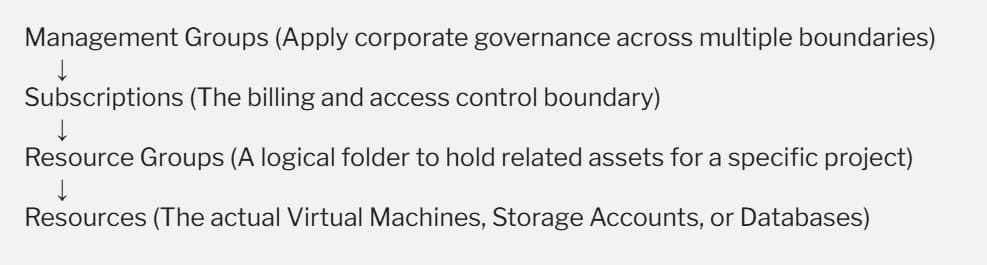
Every resource you deploy in Azure must live inside exactly one Resource Group, which ties directly back to a Subscription for billing purposes.
Phase 2: Choosing Your Role-Based Specialization Track
Once you understand basic cloud terms, you face a critical fork in the road. In the modern cloud job market, companies do not hire generic “cloud generalists.” They hire specialists who excel at specific operational roles.
After completing your foundational studies, you must align your learning roadmap with one of these three primary pathways.
| Specialization Track | Core Mission | Essential Target Certification | Primary Day-to-Day Focus |
| Cloud Administration | Managing, securing, scaling, and monitoring enterprise cloud infrastructure end-to-end. | AZ-104 (Azure Administrator Associate) | Virtual networking, identity governance, compute scaling, and backup solutions. |
| Data & AI Engineering | Designing cloud-native database systems, training models, and building data pipelines. | DP-900 / AI-901 (Data & AI Fundamentals) | Synapse Analytics, Cosmos DB, and building Azure OpenAI integrations. |
| Platform / DevOps | Automating infrastructure deployments and building continuous integration pipelines. | AZ-400 (Azure DevOps Engineer Expert) | Infrastructure as Code (IaC), GitHub Actions, and container orchestration. |
My Professional Recommendation: If you are unsure which path to take, default to the Cloud Administration (AZ-104) track. It serves as the prerequisite foundation for advanced cloud architecture and DevOps engineering. Trying to learn DevOps or Architecture without mastering basic administration is like trying to build a house on wet cement.
Phase 3: Mastering Core Infrastructure Pillars
As you transition into hands-on learning, you should focus your energy on the four pillar domains that form the backbone of 90% of all Azure environments. Master these pillars sequentially:
1. Identity and Governance (The Security Baseline)
Security in the cloud is not defined by physical firewalls; it is defined by identity access management. You must master Microsoft Entra ID (formerly Azure Active Directory).
- Authentication vs. Authorization: Learn the difference between proving who you are (Authentication) and proving what you are allowed to do (Authorization).
- Role-Based Access Control (RBAC): Practice applying the principle of least privilege. Ensure that a junior developer, for instance, only receives “Reader” permissions on a resource group rather than sweeping “Owner” rights.
- Azure Policy: Learn how to enforce organizational compliance rules globally—such as blocking your team from launching hyper-expensive server sizes that instantly bust your quarterly budget.
2. Networking (The Communication Layer)
An improperly configured network is the single fastest way to expose corporate data to the public internet.
- Virtual Networks (VNets) and Subnets: Learn how to carve up private IP address spaces to isolate your web applications from your backend databases.
- Network Security Groups (NSGs): Master the stateful firewall rules that inspect and filter traffic entering and leaving your cloud subnets.
- Hybrid Connectivity: Understand how large corporations securely bridge their local on-premises corporate offices to Azure datacenters using secure Site-to-Site VPN tunnels or private, dedicated ExpressRoute circuits.
3. Compute (The Processing Engine)
You must understand how to select the right processing tool for different workloads.
- Virtual Machines (VMs): Traditional lift-and-shift server hosting.
- Azure App Services: A PaaS environment optimized for hosting web apps and APIs without dealing with OS patching.
- Serverless and Containers: Explore lightweight options like Azure Functions for micro-task automation, alongside Azure Container Instances (ACI) for running packaged application containers efficiently.
4. Storage and Databases (The Data Layer)
Data has different values and access patterns, which means you must store it cost-effectively.
- Azure Blob Storage: Object storage built for massive amounts of unstructured data (videos, backups, large logs). You must master its lifecycle tiers: Hot (frequently accessed data), Cool (infrequently accessed data), and Archive (long-term data stored at rock-bottom pricing but requiring hours to retrieve).
- Relational vs. NoSQL: Learn when to deploy a traditional Azure SQL Database for structured transactional ledger files versus when to leverage Cosmos DB for ultra-low latency, globally distributed NoSQL document workloads.
Phase 4: Build a Practical, Hands-on Study Plan
You cannot learn the cloud simply by reading books or watching lectures passively. You must build real muscle memory.
To transition effectively from theoretical knowledge to functional implementation, structure your daily study habits using this highly efficient execution sequence:
1.Secure an Azure Free Account Safely: Account Provisioning.
Sign up for an official Azure Free Account. Take advantage of the complimentary introductory credits, but immediately set up a strict Azure Cost Alert at a low threshold ($5.00) to ensure you don’t accidentally incur personal charges while testing large resources.
2.Engage in Guided Learning Paths:Curriculum Mastery.
Utilize the completely free Microsoft Learn portal. Work through the official module exercises chronologically, using their built-in sandbox environments to practice creating resources directly within the interface.
3.Execute Timed Practice Assessments:Knowledge Validation.
Before registering for an official certification exam, take multiple full-length practice tests. Analyze your incorrect responses deeply to isolate whether your knowledge gaps stem from confusing the service names or misunderstanding the architectural requirements.
Final Thoughts:
The secret to mastering Azure is accepting that learning is an iterative, continuous process. Microsoft updates its cloud features weekly. The interface configurations you use today will likely shift slightly by next year. Stick to the roadmap, master the fundamental infrastructure pillars, and focus on building continuous hands-on experience.
You may also like the following articles:
- Microsoft Azure Tutorial For Beginners
- Azure Fundamentals
- Azure PowerShell Tutorial
- Azure Subscription Types
- Azure DevOps Tutorial
- Microsoft Entra ID Tutorial For Beginners
- Azure Data Factory Tutorial For Beginners

I am Rajkishore, and I am a Microsoft Certified IT Consultant. I have over 14 years of experience in Microsoft Azure and AWS, with good experience in Azure Functions, Storage, Virtual Machines, Logic Apps, PowerShell Commands, CLI Commands, Machine Learning, AI, Azure Cognitive Services, DevOps, etc. Not only that, I do have good real-time experience in designing and developing cloud-native data integrations on Azure or AWS, etc. I hope you will learn from these practical Azure tutorials. Read more.
