
Microsoft’s definitive platform for this enterprise workload is SAP HANA on Azure. In this comprehensive article, I will break down the certified compute topologies, dissect the critical block storage fabrics, analyze high-availability clustering matrices, and lay out an authoritative infrastructure deployment pattern for your enterprise.
SAP HANA On Azure
Architectural Blueprint: Certified Compute Topologies
An enterprise SAP migration will instantly stall if you select the wrong underlying hardware profile. SAP enforces strict performance guidelines through its official SAP Certified and Supported SAP HANA Hardware Directory. Microsoft provides two highly optimized infrastructure runways that meet these standards perfectly:
Azure Virtual Machines (VMs)
For the vast majority of scale-up transactional (OLTP) and analytical (OLAP) processing footprints, Azure’s specialized virtualized compute tiers deliver immense scalability.
- The E-Series (
Edsv4/Edsv5): The ideal baseline for small-to-medium target environments, starting at 160 GiB of RAM. - The M-Series (
M-series/Mv2/Mv3): The premier cloud engine for massive memory requirements. The M-Series family scales gracefully from 1 TB all the way to 30 TiB of RAM on a single virtual node, completely backed by pay-as-you-go flexibility or deep cost optimizations like Azure Reserved Instances.
Azure Large Instances (BareMetal Portfolio)
When an enterprise footprint exceeds standard virtualized limits—such as massive global conglomerates running ERP instances that cross the 30 TB line—traditional hypervisors can introduce structural resource constraints.
Microsoft addresses this via Azure Large Instances: purpose-built, dedicated bare-metal blade servers located within the same regional data centers as your standard virtual network. This specialized bare-metal tier expands single-node capacities up to 24 TB and supports multi-node scale-out frameworks reaching 60 TB to 120 TB for big-data warehouses.
Structural Deep Dive: Storage Architectures and Throughput Minimums
Because SAP HANA processes its working datasets entirely in-memory, it loads its whole active state into RAM on startup. However, it still requires persistent disk storage to handle regular database savepoints, commit active transaction logs, and write long-term backups.
If your storage layer cannot deliver sub-millisecond write latencies, the engine will halt processing to prevent unaligned state corruption.
SAP enforces strict minimum baseline throughput metrics across your storage channels:
- The
/hana/logVolume: Must achieve at least 250 MB/sec sequential read/write throughput with a 1 MB I/O payload size. - The
/hana/dataVolume: Requires a minimum read capability of 400 MB/sec and write performance of 250 MB/sec using 16 MB and 64 MB sequential blocks.
To meet these intensive parameters, your architectural plan should leverage the following certified block and file storage choices:
| Storage Offering | IOPS Scaling | Target Latency Profile | Primary Architectural Placement |
| Azure Premium SSD v2 | Up to 80,000 IOPS per disk independent of size. | Sub-millisecond baseline. | The modern default standard for /hana/data and /hana/log stripes. |
| Azure Ultra Disk | Up to 160,000 IOPS with fully dynamic tuning sliders. | Sub-millisecond (ultra-low). | Ideal for dedicated high-frequency transactional log paths (/hana/log). |
| Azure NetApp Files (ANF) | Linear scaling based on capacity pool configurations. | Sub-millisecond (NFSv4.1 protocol). | Exceptional choice for shared cross-node scale-out structures or /hana/shared. |
Data Volume Partitioning
Historically, storage administrators had to configure complex Linux Logical Volume Manager (LVM) stripes or mdadm arrays across multiple physical Azure disks to aggregate enough speed to pass SAP’s verification checks.
In modern installations, you can bypass this operating system complexity by leveraging native SAP HANA Data Volume Partitioning (introduced in HANA 2.0). The indexserver can distribute its active I/O processing operations across separate data files stored on independent Azure managed disks natively, eliminating the need to maintain complicated software-based RAID configurations at the Linux OS level.
High Availability and Zone Resiliency Matrices
When your entire enterprise depends on a single database layer, downtime is not an option. A hardware fault in an Azure data center cannot be allowed to bring your business operations to a halt. Azure addresses this by providing native clustering frameworks engineered around Availability Zones.
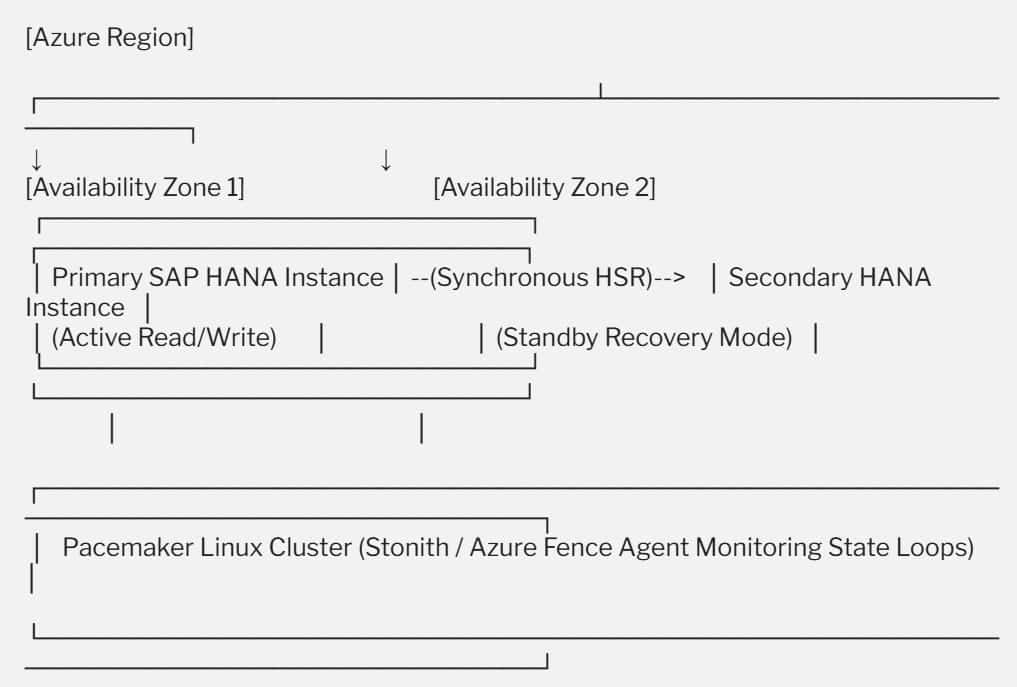
For maximum reliability, your deployment should feature an automated failover architecture spanning two independent Availability Zones:
- HANA System Replication (HSR): The primary node in Zone 1 processes all active read/write application traffic. It continually pipes a synchronous stream of data updates across a private, low-latency network path to a secondary standby instance waiting in Zone 2.
- The Pacemaker Linux Cluster: A high-availability management framework (such as SLES for SAP Applications or RHEL for SAP Solutions) monitors both nodes continuously.
- The Azure Fence Agent: If the primary node experiences a sudden hardware failure, the Pacemaker cluster utilizes the official Azure Fence Agent (
STONITH– Shoot The Other Node In The Head) via secure Azure API calls to cleanly isolate the failed VM. It instantly promotes the standby instance in Zone 2 to primary active status, updating your network routing paths in seconds without manual intervention.
Operational Ingestion to Database Layer Topology
To help your network engineering teams visualize how these moving parts i