
In this comprehensive architectural deep-dive, I will explain the core structural blueprints of Azure AI Foundry, dissect its multi-layered resource topology, analyze advanced orchestration frameworks, and outline a secure deployment strategy for your enterprise data estate.
Azure AI Foundry Architecture
Architectural Blueprint: The Core Control Plane
To deploy an enterprise AI ecosystem without introducing management silos or unpredictable cloud expenditures, you must understand how Azure AI Foundry structures its resource boundaries. The system abandons individual API endpoints in favor of a centralized workspace hierarchy.
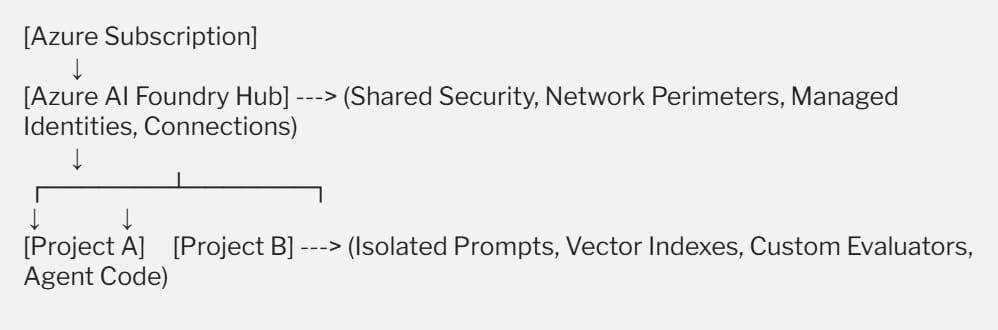
The platform’s structural blueprint relies on two central logical abstractions:
The Azure AI Foundry Hub
The foundational administrative umbrella. It serves as the centralized container for governing security, compliance, network perimeters, and billing boundaries across your organization. Instead of configuring firewalls, Azure Key Vaults, and private endpoints for every single developer project, you configure them once at the Hub level. The Hub acts as the single source of truth for corporate governance.
Azure AI Foundry Projects
Granular, agile development workspaces spun up beneath a parent Hub. A project inherits all the security, encryption, and networking properties of its parent Hub automatically. However, it isolates developer assets such as prompt catalogs, search indexes, custom evaluation datasets, and application code. This hierarchy allows a team in Chicago and a team in Atlanta to operate within their own independent project sandboxes while strictly adhering to a single, unified corporate security posture.
Structural Deep Dive: Model Catalogs and Ingestion Fabrics
An enterprise AI architecture must remain decoupled from specific model providers. As model performance shifts, your system must allow you to swap underlying foundation models with zero code friction. Azure AI Foundry achieves this model agility through its multi-tiered integration fabric.
The Unified Model Catalog
Azure AI Foundry provides an extensive, curated model catalog containing thousands of industry-leading models. These are divided into two distinct provisioning pathways based on your compliance and throughput needs:
- Serverless API (Pay-as-you-go): Hosted on managed infrastructure by Microsoft, charging you strictly per thousand input/output tokens. This allows you to tap into state-of-the-art models from OpenAI, Mistral, Meta (Llama), and Cohere instantly without provisioning raw virtual machines.
- Managed Compute (Provisioned Throughput): Deploys open-source or custom-tuned weights onto dedicated Azure GPU clusters (such as NVIDIA H100 or A100 instances). This is the gold standard for high-volume corporate applications requiring deterministic latency guarantees or strict infrastructure isolation.
Connected Data Fabrics and Ingestion Layers
An AI model is only as intelligent as the contextual data provided to it. To feed enterprise context securely into your models without running manual sync scripts, Azure AI Foundry utilizes Connections.
Connections are secure, identity-driven pointers that bridge your AI projects straight to external data lakes. The system supports native indexing connectors to read seamlessly from:
- Azure Blob Storage and SharePoint Online.
- Microsoft Fabric OneLake: Enabling zero-ETL data sharing directly from your enterprise data warehouse into your AI prompt space.
- Azure AI Search: Acting as the high-performance grounding index for real-time Retrieval-Augmented Generation (RAG) pipelines.
Advanced System Diagram: Component Interconnections
To help your engineering teams visualize how these moving parts interact during a production run, let’s explore an interactive diagram of the system topology.
Comparison Matrix: Agentic Frameworks and Prompt Workflows
When designing the execution layer of your AI applications, you must match your workflow complexity with the correct orchestration layer.
Azure AI Foundry supports a broad spectrum of development styles, ranging from basic text generation to autonomous multi-agent networks.
| Orchestration Layer | Core Execution Style | Architectural Advantage | Engineering Vulnerability |
| Prompt Flow (Visual/Code) | Linear, directed acyclic graph (DAG) pipelines mapping out specific LLM chains. | Unmatched debugging depth; clear node-by-node tracing of variables and costs. | Struggles to handle highly dynamic, non-linear human interactions smoothly. |
| Azure AI Agent Service (Managed) | State-aware, autonomous execution loops backed by specialized system tools. | Fully manages conversational state, thread history, and tool execution automatically. | High reliance on model reasoning depth; requires strict timeout and guardrail controls. |
| Semantic Kernel / LangChain SDK | Native code-first abstraction frameworks executing inside your application runtime. | Infinite flexibility; allows developers to write custom memory plugins in C#, Python, or Java. | Requires managing local hosting infrastructure and manual state synchronization. |
Step-by-Step Tutorial: Provisioning an Enterprise Hub Infrastructure
To establish a secure, compliant Azure AI Foundry environment for your organization, follow this disciplined setup sequence to ensure proper network isolation and identity governance from day one:
1. Provision the Central Azure AI Foundry Hub Container: Control Plane Setup.
Log in to your Azure corporate tenant, navigate to the Marketplace, and select Azure AI Foundry Hub. Name your resource according to company standards, bind it to a high-availability primary region (e.g., East US 2), and