
In this article, I will break down the structural architecture of the Azure Subscription ID, explain its placement within the cloud hierarchy, demonstrate exactly how to retrieve it across multiple administrative interfaces, and map out the definitive enterprise governance strategies you need to manage your cloud environments safely.
What is an Azure Subscription ID?
To understand the Subscription ID, you must first understand the fundamental concept of an Azure Subscription itself. An Azure Subscription is a logical agreement between your organization and Microsoft that authorizes you to provision and utilize cloud resources.
It serves two primary functions: a billing boundary (where all resource consumption is rolled up into a single monthly invoice) and a governance boundary (where access controls and operational policies are enforced).
The Azure Subscription ID is a globally unique, 36-character string formatted as a GUID (Globally Unique Identifier). It breaks down into an alphanumeric pattern of 8-4-4-4-12 characters, separated by hyphens.
Here is what a typical structural model of a Subscription ID looks like:
$$\text{11111111-2222-3333-4444-555555555555}$$
Every single cloud resource you provision—whether it is a massive Azure SQL database cluster, an advanced AI model deployment, or a simple storage account—must live within a specific subscription. The database engine maps every operational event and cost transaction directly back to this specific 36-character GUID.
Where the Subscription ID Fits
A common point of confusion for engineering teams is distinguishing the Subscription ID from other high-level cloud identifiers like the Tenant ID. To keep your infrastructure organized, you must understand Microsoft’s four-tier management hierarchy.
[Root Management Group] ➔ [Microsoft Entra Tenant ID] ➔ [Azure Subscription ID] ➔ [Resource Group]- Microsoft Entra Tenant ID: This GUID represents your entire organization’s identity directory. It handles user authentication, security groups, and device registrations. A single Tenant ID can house and manage hundreds of distinct Azure Subscriptions.
- Azure Subscription ID: This lives directly underneath the Tenant tier. It functions as the dedicated container for your computing resources and billing streams.
- Resource Group: A sub-container inside a specific subscription used to group resources that share identical lifecycles.
To clarify these structural relationships across your operational teams, use this comparative guide:
| Architectural Metric | Microsoft Entra Tenant ID | Azure Subscription ID |
| Primary Scope | Identity and Authentication boundary. | Resource management and Billing boundary. |
| Logical Quantity | Typically one per enterprise organization. | Can range from dozens to hundreds per enterprise. |
| Core Function | Tracks who can log in and access your network. | Tracks what resources are running and how they are billed. |
| Relationship Link | Serves as the authoritative parent of the subscription. | Trusts the parent Entra Tenant for all identity validation. |
How to Retrieve Your Azure Subscription ID
As a cloud administrator, you need to know how to locate this identifier quickly across different operational environments, whether you prefer clicking through a graphical user interface or executing automated scripting pipelines.
Method 1: Utilizing the Azure Portal (GUI)
The most common way to find your identifier is through the native administrative web console:
- Step 1: Sign in securely to the Azure Portal (
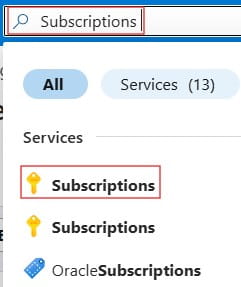
portal.azure.com). - Step 2: In the centralized search bar at the very top of the interface, type “Subscriptions” and select the service icon marked with a yellow key.
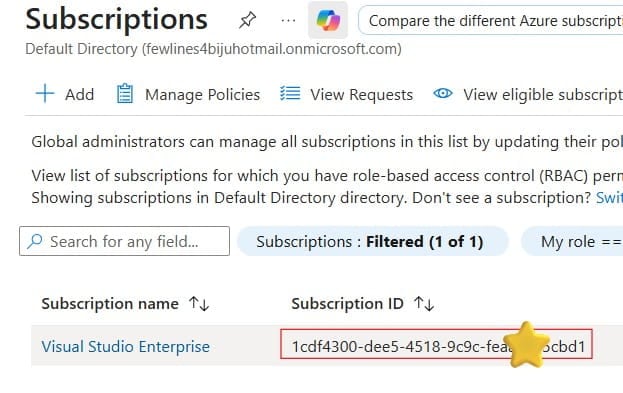
- Step 3: The main screen will display a complete table of all subscriptions you have permission to view. Locate the target subscription name; the 36-character GUID is displayed directly in the second column titled Subscription ID.
- Step 4: Click on the specific subscription name to open its Overview essentials panel. Click the small “Copy to clipboard” icon situated right next to the ID string to safely capture the value without risking a manual typo.
Method 2: Utilizing the Azure CLI (Command Line)
For DevOps engineers who operate primarily within terminals or build Infrastructure-as-Code (IaC) deployment pipelines using Terraform or Bicep, the Azure CLI is the most efficient retrieval tool:
Bash
# Log in to your cloud account environment
az login

# List all active subscriptions in a clean, human-readable table
az account list --output table
The output will display the display name, tenant association, and the exact SubscriptionId string for every environment available to your credentials.
Method 3: Utilizing Azure PowerShell
If your enterprise environment is heavily integrated with Windows-based automation or customized administration scripts, you can pull your identifiers instantly using the Azure PowerShell module:
PowerShell
#