
In this comprehensive guide, I will walk you through exactly what Azure Hybrid Benefit is, how it works across different workloads, how to calculate your savings, and how to activate it across your enterprise.
Azure Hybrid Benefit
What Is Azure Hybrid Benefit?
Azure Hybrid Benefit (AHB) is a licensing policy offered by Microsoft that allows organizations to bring their existing on-premises software licenses—specifically those covered by active Software Assurance (SA) or qualifying Server Subscriptions—to Microsoft Azure.
Instead of paying the full, bundled price for an Azure Virtual Machine (which includes both the underlying compute infrastructure and the software license fee), AHB allows you to pay only the base compute rate. The software license component is waived because you’ve already paid for it on-premises.
Standard Azure Pay-As-You-Go Rate = Base Compute Infrastructure + Windows/SQL License Fee
Azure Hybrid Benefit Rate       = Base Compute Infrastructure ONLY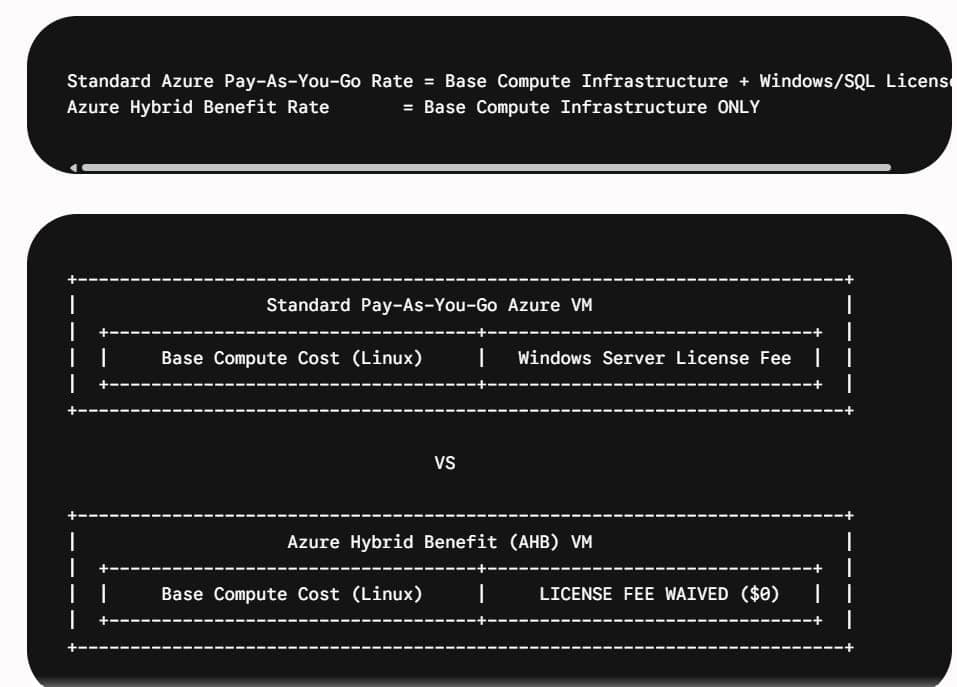
Qualifying Products: What Software Can You Bring to Azure?
Not every Microsoft license qualifies for Azure Hybrid Benefit. To take advantage of this policy, your on-premises licenses must fall under one of two buckets:
- Commercial licenses with active Software Assurance (SA)
- Qualifying active cloud Server Subscriptions (purchased via Cloud Solution Provider / CSP agreements)
Here is a breakdown of the primary software workloads eligible for AHB:
1. Windows Server
- Windows Server Standard Edition: Allows you to convert on-premises core licenses to cover Azure VMs.
- Windows Server Datacenter Edition: Provides the most aggressive savings because of dual-use rights (more on this below).
2. SQL Server
- SQL Server Standard Edition (Core-based)
- SQL Server Enterprise Edition (Core-based)
- Applies across:
- Azure SQL Database (Single Database, Elastic Pools)
- Azure SQL Managed Instance
- SQL Server on Azure Virtual Machines (IaaS)
- Azure Data Factory Integration Runtime
3. Linux Subscriptions
Many enterprise technology directors are surprised to learn that AHB isn’t limited to Microsoft software. You can bring qualifying open-source enterprise subscriptions to Azure, including:
- Red Hat Enterprise Linux (RHEL)
- SUSE Linux Enterprise Server (SLES)
4. Azure Stack HCI & Azure Arc
AHB extends beyond native Azure cloud VMs. You can apply AHB to:
- Azure Stack HCI: Waive the host service fee and Windows Server guest subscription fees.
- Azure Arc-enabled servers: Apply SQL Server AHB to non-Azure environments (such as AWS, GCP, or on-premises VMware clusters) managed by Azure Arc.
How Azure Hybrid Benefit Works for Windows Server
Understanding how Microsoft counts and maps cores from on-premises to the cloud is essential for compliance and cost tracking.
Core Conversion Mechanics
For Windows Server, licensing is evaluated in 16-core blocks.
- A minimum of 16 core licenses (with active Software Assurance) is required to start using AHB for Windows Server.
- Once you have met the 16-core baseline, you license VMs in increments of 8 cores.
| Azure VM Size | Minimum Cores Required | Notes |
| 1 to 8 vCPUs (e.g., Standard_D2s_v5) | 8 Cores | Minimum allocation per VM is 8 cores, even if the VM has fewer than 8 vCPUs. |
| 16 vCPUs (e.g., Standard_D16s_v5) | 16 Cores | Exactly matches the 16-core allocation. |
| 32 vCPUs (e.g., Standard_D32s_v5) | 32 Cores | Requires four 8-core license packs. |
Pro Tip from the Field: Because the minimum allocation for any Windows Server VM under AHB is 8 cores, applying AHB to tiny 2-vCPU or 4-vCPU VMs can burn through your available core licenses quickly. Always prioritize allocating your AHB cores to larger VMs (8 vCPUs and above) first to maximize your return on investment.
Datacenter vs. Standard Edition: The “Dual-Use” Advantage
This is where strategic licensing can save your enterprise millions.
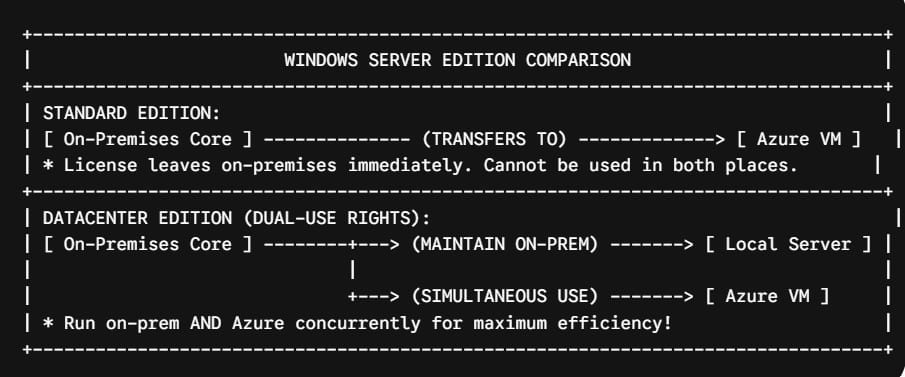
- Windows Server Standard Edition: When you allocate a Standard license to Azure, you must decommission or re-license the corresponding on-premises physical workload. You cannot use the license in both places simultaneously (except during a temporary 180-day migration window).
- Windows Server Datacenter Edition: Includes Dual-Use Rights. You can run your on-premises physical hypervisors and simultaneously spin up Azure VMs using the exact same Datacenter core licenses. This provides an extraordinary runway for hybrid enterprise migrations.
How Azure Hybrid Benefit Works for SQL Server
SQL Server licensing in Azure via AHB yields some of the highest cost reductions in the entire cloud ecosystem. Because SQL Server software licenses are significantly more expensive than underlying hardware, turning on AHB for SQL workloads routinely cuts monthly database costs by 50% to 55%.
Core Mapping Ratios
Unlike Windows Server, SQL Server core conversions depend directly on which edition you own and which Azure service model you deploy.
1. SQL Server Standard Edition
- 1 Core License (On-Premises) = 1 vCPU in Azure SQL Database, Azure SQL Managed Instance, or SQL Server Azure VM.
2. SQL Server Enterprise Edition
Enterprise Edition offers enhanced flexibility through Core Multipliers:
- 1 Core License (On-Premises) = 1 vCPU in SQL Server Enterprise Azure VMs.
- 1 Core License (On-Premises) = 4 vCPUs in Azure SQL Database (General Purpose or Business Critical) or Azure SQL Managed Instance.
This 1:4 core virtualization multiplier for Azure SQL managed services is a major financial win. If you own a 16-core SQL Server Enterprise license with Software Assurance, you can license up to 64 vCPUs of Azure SQL Database General Purpose tier without paying a single dollar in database software fees.
Azure Hybrid Benefit vs. Reserved Instances: Combining for Maximum Savings
A common misconception among IT directors is that you must choose between Azure Hybrid Benefit and Azure Reserved Instances (RIs).
In reality, they target completely different parts of your bill and are designed to stack on top of each other.
| Cost Component | Managed By | Savings Mechanism |
| Software Licensing (Windows / SQL / RHEL) | Azure Hybrid Benefit | Brings existing licenses to waive software fees. |
| Compute Hardware (RAM, CPU, Storage fabric) | Reserved Instances (1 or 3 Year) | Commits to continuous compute capacity for a discount. |
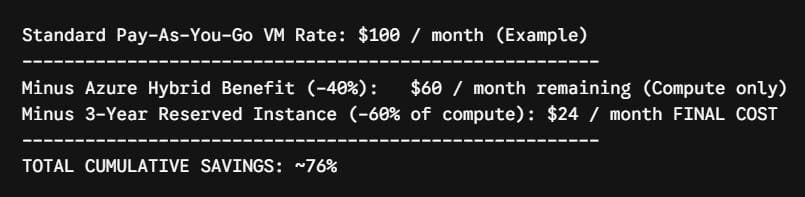
Calculating Your Savings: A Real-World Financial Comparison
To demonstrate the real financial impact, let’s analyze a realistic U.S. enterprise scenario.
The Scenario
- Location: East US Azure Region
- Workload: 20 Application Servers (Windows Server) + 4 Enterprise Database Servers (SQL Server)
- VM Specs:
- App Servers:
Standard_D8s_v5(8 vCPUs, 32 GB RAM) - DB Servers:
Standard_E16s_v5(16 vCPUs, 128 GB RAM)
- App Servers:
- Timeline: 3-Year Operational Horizon
Cost Breakdown Table (Estimated Annual Rates)
| Server Category | Quantity | Standard Pay-As-You-Go | AHB Only | AHB + 3-Year Reserved Instances |
App Servers (D8s_v5) | 20 | $84,100 / yr | $48,200 / yr | $19,200 / yr |
SQL DB Servers (E16s_v5 + Enterprise SQL) | 4 | $198,000 / yr | $92,000 / yr | $36,800 / yr |
| TOTAL ANNUAL SPEND | 24 VMs | $282,100 / yr | $140,200 / yr | $56,000 / yr |
| 3-YEAR TOTAL SPEND | $846,300 | $420,600 | $168,000 | |
| TOTAL SAVINGS ($) | Baseline | $425,700 Saved | $678,300 Saved |
By leveraging Microsoft licenses your company already owns, you keep hundreds of thousands of dollars in capital directly on your balance sheet.
Step-by-Step Tutorial: How to Enable Azure Hybrid Benefit
Activating Azure Hybrid Benefit is simple, non-disruptive, and requires zero downtime. You can enable it during initial resource deployment or toggle it on for running production workloads.
Here is how to activate AHB across your fleet using three common administrative methods:
Method 1: Via the Azure Portal (GUI)
For Windows Server Virtual Machines:
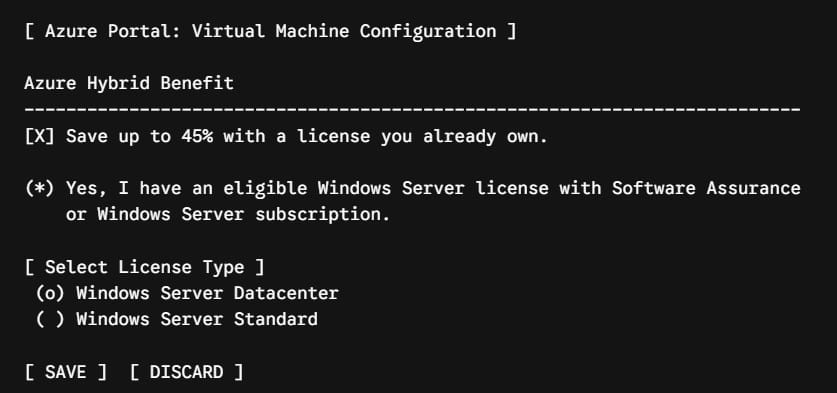
- Log into the Azure Portal (
portal.azure.com). - Search for and select Virtual Machines, then select your target VM (e.g.,
app-server-prod-01). - Under the Configuration section in the left navigation menu, click Configuration.
- Locate the Azure Hybrid Benefit section.
- Check the box that reads: “I confirm I have an eligible Windows Server license with Software Assurance or Windows Server subscription to apply this Azure Hybrid Benefit.”
- Click Save.
For SQL Server Virtual Machines / Azure SQL Databases:
- Navigate to your SQL Virtual Machine or Azure SQL Database resource.
- Select Compute + Storage or Configure under Settings.
- Locate Azure Hybrid Benefit.
- Select Yes under “Do you want to use an existing SQL Server license?”.
- Confirm licensing compliance and click Apply.
Method 2: Via Azure PowerShell
If you manage large environments, executing this via automation scripts is much faster than manual clicking.
Enabling AHB on an Existing Windows VM:
PowerShell
# Define resource parameters
$rgName = "rg-enterprise-prod-eastus"
$vmName = "vm-web-prod-01"

# Retrieve current VM configuration
$vm = Get-AzVM -ResourceGroupName $rgName -Name $vmName

# Set LicenseType property to Windows_Server
$vm.LicenseType = "Windows_Server"

# Update the VM in Azure (No restart required)
Update-AzVM -ResourceGroupName $rgName -VM $vm
Enabling AHB on a SQL Server VM:
PowerShell
# Update SQL Virtual Machine License Type
Update-AzSqlVM -ResourceGroupName "rg-enterprise-prod-eastus" `
               -Name "vm-sql-prod-01" `
               -LicenseType "AHUB"
Method 3: Via Azure CLI
For Cloud Engineers using Linux bastions, macOS administrative terminals, or automated CI/CD deployment pipelines:
Enabling AHB on an Existing Windows VM:
Bash
az vm update \
  --resource-group rg-enterprise-prod-eastus \
  --name vm-app-prod-02 \
  --set licenseType=Windows_Server
Disabling AHB (Reverting to Pay-As-You-Go):
Bash
az vm update \
  --resource-group rg-enterprise-prod-eastus \
  --name vm-app-prod-02 \
  --set licenseType=None
Best Practices for Enterprise Compliance
- Centralize Governance via Azure Policy:Use built-in Azure Policy definitions to control who can enable AHB. You can enforce policies that prevent non-approved subscription groups from toggling the AHB flag without approval from your IT Asset Management (ITAM) team.
- Maintain a Live License Inventory:Before enabling AHB across your cloud tenant, perform a true-up check with your Software Asset Manager. Ensure your active Software Assurance or CSP server subscriptions cover your total assigned Azure core count.
- Track AHB Usage with Azure Cost Management:Utilize Azure Cost Management + Billing to tag, filter, and monitor resources utilizing AHB. Set up automated alerts to track unexpected spikes in compute core allocations.
- Leverage Azure Cost Optimization Recommendations:Azure Advisor automatically scans your inventory and identifies VMs or SQL databases that are eligible for AHB but currently running at full pay-as-you-go rates. Review these recommendations monthly.
Frequently Asked Questions (FAQ)
Does enabling Azure Hybrid Benefit cause server downtime?
No. Toggling the AHB license flag on an existing virtual machine or database is a metadata-only change in the Azure control plane. It changes how your subscription is billed starting from the exact minute you apply it. It does not restart the VM, drop database connections, or interrupt services.
What happens if my Software Assurance (SA) expires?
If your Software Assurance contract lapses and is not renewed, you lose the right to use Azure Hybrid Benefit. You are contractually required to update your Azure resources back to standard pay-as-you-go licensing (LicenseType = None).
Can I use AHB on non-Microsoft operating systems?
Yes. As outlined earlier, AHB supports Linux enterprise workloads, specifically Red Hat Enterprise Linux (RHEL) and SUSE Linux Enterprise Server (SLES) subscriptions, allowing you to seamlessly convert pay-as-you-go Linux VMs to bring-your-own-subscription (BYOS) models.
Is there an extra charge to activate AHB?
No. Azure Hybrid Benefit is a feature built into Azure’s control plane at no extra charge. You only pay for the software licenses through your Microsoft Volume Licensing agreement.
Final Thoughts: Stop Overpaying for Your Cloud Today
Azure Hybrid Benefit is one of the most powerful, immediate levers you have to lower your cloud bill. If your company holds active Microsoft Software Assurance or Server Subscriptions, running un-discounted pay-as-you-go workloads in Azure means leaving significant capital on the table.
You may also like the following articles:

I am Rajkishore, and I am a Microsoft Certified IT Consultant. I have over 14 years of experience in Microsoft Azure and AWS, with good experience in Azure Functions, Storage, Virtual Machines, Logic Apps, PowerShell Commands, CLI Commands, Machine Learning, AI, Azure Cognitive Services, DevOps, etc. Not only that, I do have good real-time experience in designing and developing cloud-native data integrations on Azure or AWS, etc. I hope you will learn from these practical Azure tutorials. Read more.