
In this comprehensive tutorial, we will explore what Azure Management Groups are, how they structure the overarching cloud hierarchy, and how to use them to enforce policies and security at scale.
Azure Management Groups
What are Azure Management Groups?
At their core, Azure Management Groups are logical containers that allow you to organize, manage, and apply governance conditions across multiple Azure subscriptions simultaneously. They introduce a layer of scope that sits cleanly above your subscriptions, forming a top-tier administrative framework.
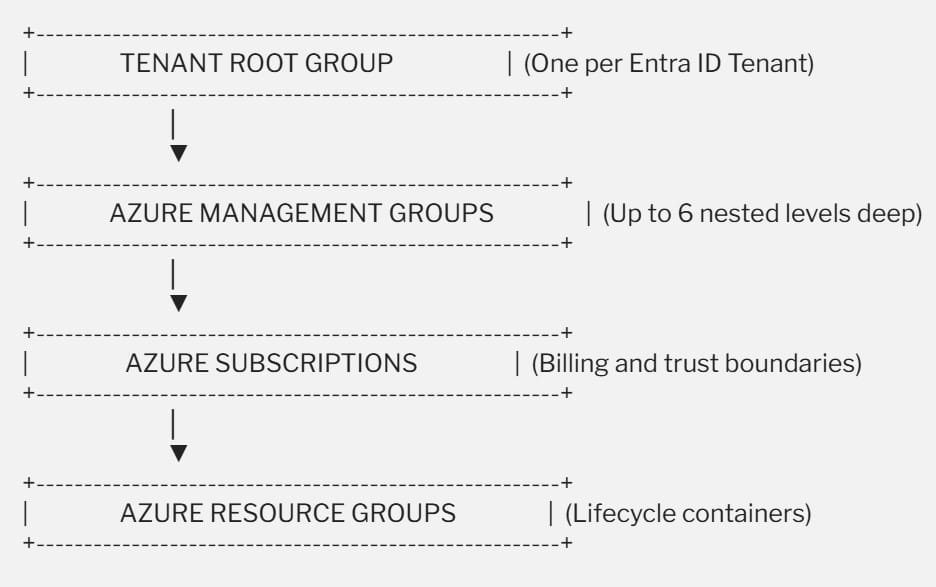
When you place multiple subscriptions into a management group, any governance conditions you apply to that group—such as an Azure Policy definition or an RBAC role assignment—automatically propagate downward via inheritance to all nested management groups, subscriptions, resource groups, and the individual cloud resources themselves.
Architectural Rules and Technical Limits
To design an effective management group hierarchy, it is important to understand the hard boundaries built into the Azure Resource Manager (ARM) engine. Microsoft enforces specific structural rules to maintain performance and avoid overly deep setups:
- The Tenant Root Group: Every single Azure Entra ID tenant automatically receives a single, immutable top-level container known as the Root Management Group. All other custom management groups and newly created subscriptions fold up underneath this root group.
- Hierarchy Depth Limits: Your custom management group tree can support a maximum depth of six levels. Importantly, this six-level limit does not include the ultimate Tenant Root Group or the target subscription layer.
- Single-Parent Constraint: A management group or an individual subscription can support exactly one direct parent. You cannot map a subscription to two distinct management groups simultaneously. However, a single parent group can host an unlimited number of children.
- Scale Capacity: A single Microsoft Entra ID directory can scale up to support a maximum of 10,000 distinct management groups.
Core Capabilities: Governance and Access Control at Scale
There are two primary reasons why enterprise platform teams deploy management groups: Policy Enforcement and Access Management.
1. Unified Policy Enforcement
Imagine your compliance team issues a mandate: to adhere to specific financial regulations, no corporate data or compute resources can ever be deployed outside of the continental United States.
Without management groups, you would have to manually attach an “Allowed Locations” Azure Policy to every single subscription. If a team creates a new subscription next week, that policy might be forgotten, creating a compliance gap.
By applying the “Allowed Locations” policy directly at a high-level management group, the restriction instantly applies to all current and future descendant subscriptions. Even a subscription owner or a full resource administrator cannot bypass or overwrite this rule at their local scope.
2. Streamlined Role-Based Access Control (RBAC)
Managing access permissions on a subscription-by-subscription basis can lead to configuration drift and administrative fatigue.
With management groups, you can assign an Entra ID security group a role like Network Contributor at the management group level. Instantly, every engineer in that group gains full authority to manage virtual networks, ExpressRoute circuits, and firewalls across every single subscription nestled under that group. One single assignment replaces what used to require dozens of duplicate tasks.
Architectural Comparison: Where Do Management Groups Fit?
| Scope Level | Primary Technical Purpose | Key Inherited Artifacts | Typical Target Audience |
| Management Group | Global compliance, corporate guardrails, and enterprise access consolidation. | Azure Policies, Blueprints, high-level RBAC roles. | Enterprise Architects, Cloud Engineering Leads, Compliance Officers. |
| Subscription | Acts as the primary financial billing boundary and trust isolation point. | Spending quotas, service alerts, subscription-specific permissions. | Business Unit Managers, DevOps Directors, Finance Coordinators. |
| Resource Group | Groups related resources sharing an identical operational lifecycle. | Clean deployment state, diagnostic settings, local resource locks. | Application Developers, System Administrators. |
The Microsoft Cloud Adoption Framework (CAF) Blueprint
When designing a production-grade management group tree, avoid the temptation to mirror your company’s internal HR org chart. Corporate re-organizations happen frequently, and shifting your management group structure to reflect every personnel change can create an administrative burden.
Instead, the Microsoft Cloud Adoption Framework (CAF) recommends structuring your hierarchy based on workload type, security baselines, and connectivity requirements. Here is an architectural blueprint modeled after the CAF landing zone reference structure:
The Recommended Sub-Group Tiers
- The Intermediate Root Group: Create a custom management group right below the Tenant Root Group, named after your organization. This leaves the absolute root clean and gives you an isolated point to begin your custom architecture.
- The Platform Group: This branch hosts core shared subscriptions managed by your central infrastructure or platform teams. It typically contains dedicated subscriptions for core identity services (domain controllers) and centralized management or logging.
- The Landing Zones Group: This is where your customer-facing and internal business workloads reside. It is often split into: