
In this comprehensive article, I will break down the distinction between a Feature and a User Story. The structural hierarchy of Azure DevOps explains the strategic purpose of each work item type. By the end of this tutorial, you will have the authority to structure your project for maximum transparency and velocity.
Feature Vs User Story Azure DevOps
The Azure DevOps Work Item Hierarchy
To understand the difference between a Feature and a User Story, we first must look at the “Design” of the Azure DevOps Agile process.
In Azure DevOps, the standard hierarchy follows this flow:
- Epic: The high-level business initiative (e.g., “Launch Mobile Banking App”).
- Feature: A specific capability that provides value to the user (e.g., “Biometric Login”).
- User Story: A granular piece of work that can be completed in a single sprint (e.g., “As a user, I want to use FaceID to log in”).
- Task: The technical “to-do” list for the developer (e.g., “Integrate iOS LocalAuthentication API”).
Defining the “Feature” in Azure DevOps
A Feature as a significant functional requirement that cannot be completed within a single sprint. Features represent the “What” from a business perspective.
Characteristics of a Feature
- Timeframe: Typically spans multiple sprints (2–4 weeks each).
- Audience: Stakeholders, Product Managers, and Marketing teams.
- Measurement: Success is measured by the delivery of a usable capability.
- Parentage: Features always roll up into an Epic.
For example, if a Product Manager at a major retail firm wants to implement a new “Loyalty Rewards Program,” that is far too large for one sprint. We categorize the “Rewards Dashboard” as a Feature.
Defining the “User Story” in Azure DevOps
If the Feature is the “What,” the User Story is the “Who” and the “Action.” In Azure DevOps, the User Story is the smallest unit of work that still delivers value to the end user.
Characteristics of a User Story
- Timeframe: Small enough to be completed within one sprint.
- Audience: The Development Team and QA Engineers.
- Measurement: Success is defined by the Acceptance Criteria.
- Parentage: User Stories are “children” of a Feature.
A User Story must follow the INVEST principle: Independent, Negotiable, Valuable, Estimable, Small, and Testable.
Key Differences: Feature vs. User Story
To help you visualize the distinction, below is a comparison table.
| Attribute | Feature | User Story |
| Granularity | Broad / High-level | Detailed / Specific |
| Duration | Multiple Sprints (1–3 months) | Single Sprint (1–4 weeks) |
| Owner | Product Manager / Architect | Development Team / Product Owner |
| Estimation | T-Shirt Sizing (Large, XL) | Story Points (Fibonacci: 3, 5, 8) |
| Azure Board View | Portfolio Backlog | Product Backlog / Sprint Board |
| Definition of Done | Functional capability is live | Acceptance criteria are met |
Structuring Your Backlog: A Professional Tutorial
Let’s walk through how to actually implement this in Azure DevOps. Follow these steps.
- Open your project in Azure DevOps.
- Go to Boards > Backlogs.
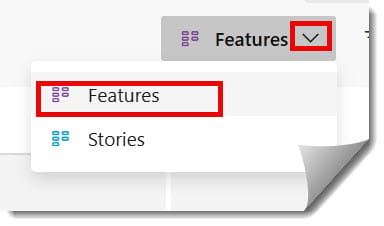
- In the top right corner, you will see a toggle for Backlog levels.
- Switch between Features and Stories to see how they nest.
Step 2: Mapping Stories to Features
The biggest mistake I see teams make is creating “orphaned” User Stories. To avoid this:
- Go to the Features backlog.
- Click the (+) icon next to a Feature.
- Select a User Story to create a linked child item.
- Alternatively, use the Mapping pane on the right side of the screen to drag-and-drop existing Stories onto their parent Features.